
DNS over TLS (DoT) is a way of encrypting DNS queries that improves privacy and protection against interception by attackers. In OPNsense you can enable DoT using the built-in Unbound DNS server.
Setting up Unbound DNS, split DNS, fighting ads, or how I stopped using Pi-hole, part 1#
If you enjoyed this article, you can support the author by becoming a sponsor on Boosty (link in the contacts section).
Those who watch my videos on YouTube know that I’ve long used Opnsense at home as a router and firewall. By default, Opnsense uses Unbound DNS as its DNS resolver. This is actually a very cool solution that ended up replacing a lot of different services for me, giving me just a single point of failure. On one hand that might sound like a downside, but in this particular case it’s actually a plus. Why? Because when DNS problems come up - and problems are always DNS - now you only need to look in one place, rather than, as before, wondering whether it’s Opnsense or Pi-hole, etc. But let’s take things in order.
Unbound DNS is an open-source recursive DNS server developed by NLnet Labs. It focuses on security, performance, and compliance with modern DNS standards. In OPNsense it is the default DNS server. Unbound works as a recursive resolver, meaning it queries DNS records itself, starting from the root servers, without relying on third-party public resolvers (such as 8.8.8.8).
List of Unbound DNS features#
- DNSSEC to verify the authenticity of DNS responses.
- Local DNS overrides - local DNS records.
- DNS over TLS (DoT) and DNS over HTTPS (DoH).
- Access control - configuring DNS access permissions.
- Caching - query caching.
Advantages of using Unbound DNS in OPNsense#
- Security
· Support for DNSSEC. · The ability to enable DNS over TLS, which encrypts DNS traffic. · A minimal number of external trusted points - resolving directly from root servers.
- Performance
· Very fast and lightweight. · Efficient caching: frequent queries are handled instantly. · Works well even on modest hardware (home routers, mini-PCs).
- Flexibility
· You can define your own zones, redirects, and ad blocking. · Supports access configuration by IP, interface, and port.
- Privacy
· No dependency on external public DNS providers (unlike Google, Cloudflare, etc.). · No logging of DNS queries unless you configure it manually.
- Deep integration with OPNsense
· Managed through the web interface. · Supports DHCP Static Mappings in combination with DNS. · Compatible with firewall, VLAN, and alias settings.
Downsides and limitations of Unbound DNS#
- Slow resolution of the first queries
- With full recursive mode enabled, the first DNS query can be a bit slower than with public resolvers that have a preloaded cache.
- This is especially noticeable after a reboot or cache clear.
- Configuration complexity
- Some features (for example, DNS over TLS, ad blocking) require manual configuration in configuration files or via advanced settings.
- Not for beginners if you need complex filtering rules or non-standard routing.
- No built-in ad filtering
- Unlike Pi-hole or AdGuard Home, Unbound doesn’t filter ads out of the box - manual activation of the corresponding functionality is required (in practice, a couple of mouse clicks, so this downside is fairly minor).
- You have to manually choose blocklists, whose names aren’t always intuitive.
- No nice graphical query logging
- There’s no nice statistics and interface like AdGuard Home or Pi-hole has (there is an unattractive one - actually the graphics there are fine).
Setup procedure#
All DNS queries are routed in plain text. Your internet provider or a hacker can intercept UDP and TCP traffic on port 53 in the clear in order to compromise DNS queries and responses. For this reason we need to encrypt our DNS queries for security. DNS over TLS (DoT) is a security protocol that uses Transport Layer Security (TLS) to encrypt DNS traffic, and it is one of the most widespread DNS security solutions. The main goal is to improve your security and privacy. Here are a few advantages of DNS over TLS:
- Preventing DNS manipulation by an attacker.
- Eliminating man-in-the-middle attacks. This is when your request is intercepted and redirected to some phishing site.
- Preventing surveillance. Well, for a home setup this is admittedly rather far-fetched.
Enabling DoT in Opnsense#
To configure and enable DoT on the OPNsense firewall, perform the following steps:
- Go to “Services” → “Unbound DNS” → “DNS over TLS” in the OPNsense web interface.
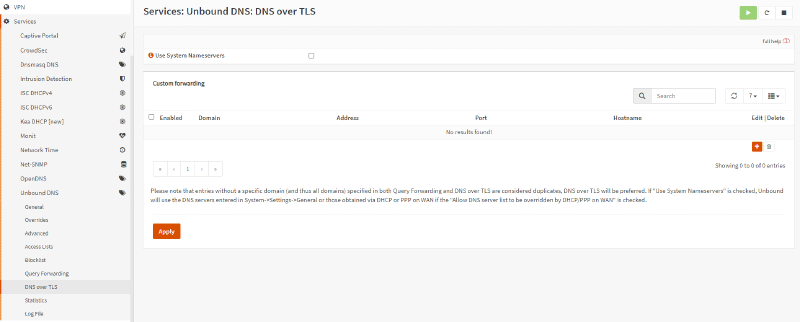
- Click the “Add” button with the + icon in the bottom-right corner of the panel.
- Make sure the “Enabled” option is checked.
- You can leave the Domain field empty. By default, if you leave this field empty, all queries will be routed to the specified server. Entering a domain name in this field will route queries for that specific domain to the selected server.
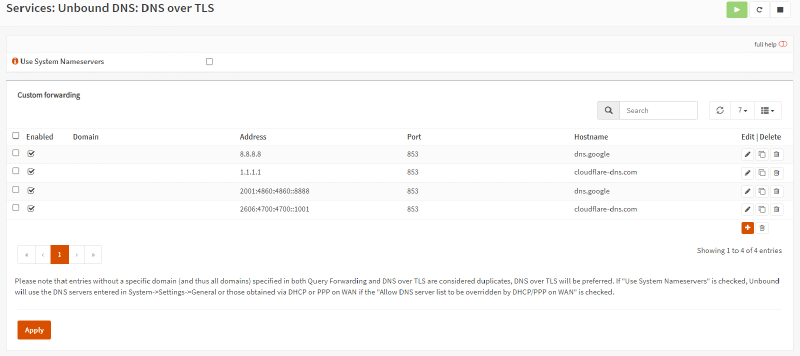
- Enter the IP address of the DNS server to forward all queries to, for example 8.8.8.8.
- Set the server port for DoT to 853.
- Enter the common name of the DNS server (for example, dns.google.com) in the Verify CN field to verify its TLS certificate. DNS-over-TLS is vulnerable to man-in-the-middle attacks if the authenticity of certificates cannot be verified. You can leave the field empty to accept self-signed certificates, but this completely negates the point of what we’re doing in this article.
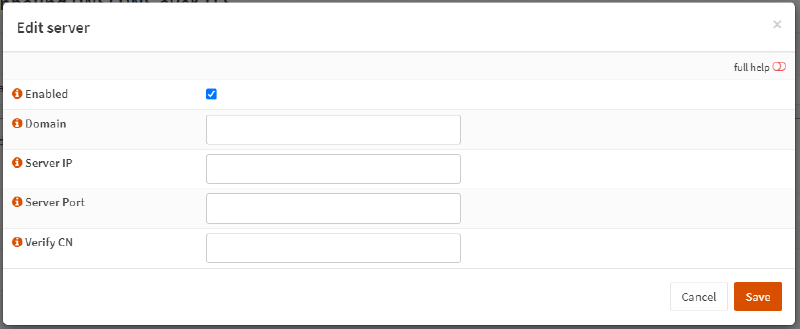
- Click “Save”.
- You can add an IPv6 DNS server as a secondary DNS resolver.
- Click “Apply” to activate the settings.
In the end you’ll get something like this
Configuring DNS and DHCP servers#
To force all clients on your network to use the DoT servers you defined above, you must correctly configure your DNS and DHCP servers. You can configure the DNS and DHCP services in OPNsense by performing the following steps:
- Go to System → Settings → General in the left menu.
- Make sure all the DNS server fields are empty. This ensures that DNS traffic is redirected back to the router.
- Uncheck “Allow DNS server list to be overridden by DHCP/PPP on WAN” for the DNS server settings. If this option is enabled, the DNS servers provided by the DHCP/PPP server on the wide-area network (WAN) (translating for you: this means your ISP’s DNS servers) will be used for their intended functions, such as providing DNS services. And accordingly they will take priority.
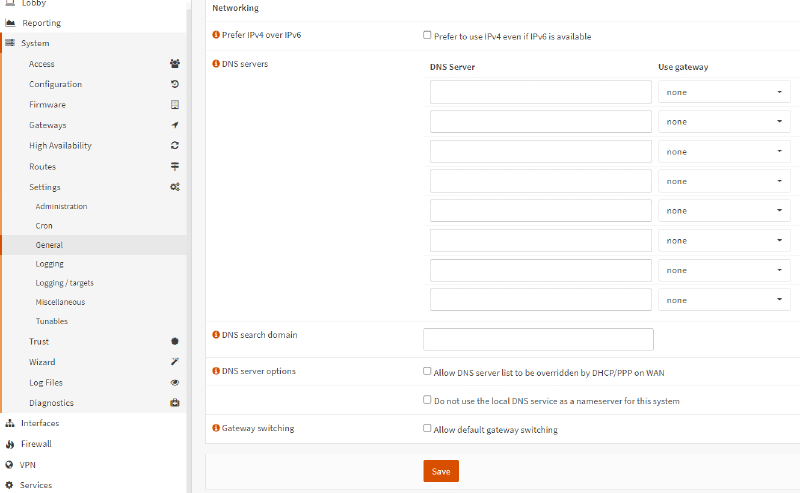
- Click “Save”.
- Go to Services → ISC DHCPv4 → LAN in the OPNsense web interface.
- Make sure the DNS Servers fields are empty. We should use the default system DNS servers.
- Click “Save”, then click the “Apply Changes” button in the top-right corner if the setting was changed.
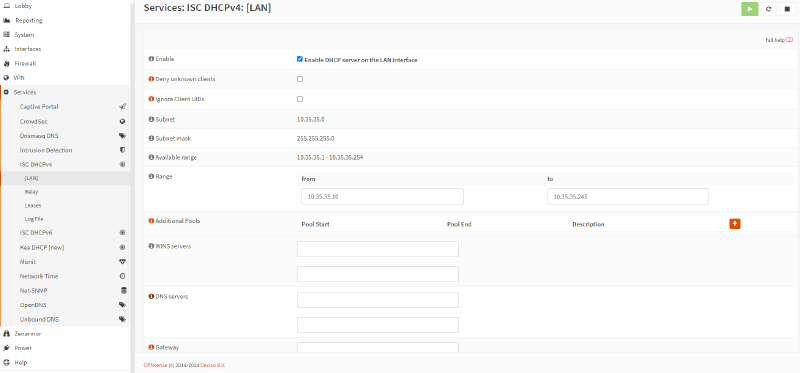
To ensure a secure and trusted environment, it is recommended to use a firewall rule that blocks all outbound DNS traffic on port 53 when using DNS over TLS, which for us uses port 53. If clients decide to query other name servers directly on their own, you can use a NAT redirect rule to send those requests to 127.0.0.1:53, which is the local Unbound service. This guarantees that those queries will definitely be sent over TLS.
The list of CN domains used for DoT should be checked for the relevant provider. For Quad9 it is - dns.quad9.net.
If DNS over HTTPS suits you better than DoT, I cover setting up DNSCrypt-proxy with DoH support in my article on DNS over HTTPS in OPNsense.