
The outcome of article 3 - and the first doubts#
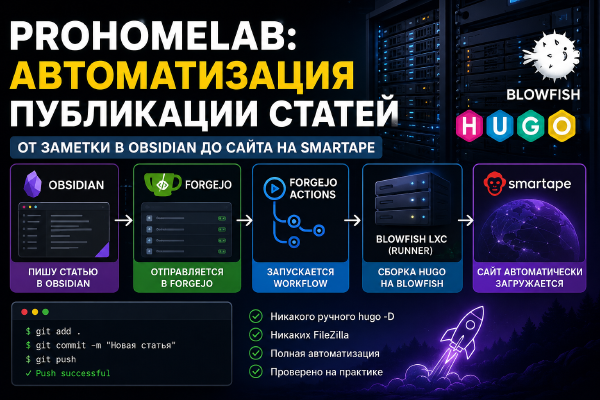
In the third article of the series I merged prohomelab-content and prohomelab-site into a single prohomelab-pages-new repository, set up a self-hosted GitHub Actions runner right on the LXC, and in the end the whole cycle - from a note in Obsidian to a published article - ended up working fully automatically. On paper, that was an improvement. Or so it seemed. One repository instead of two, no workflow_dispatch bridge between them.
In practice, over the course of one evening I ran into: a self-hosted runner that refuses to start as root; confusion between GitHub’s built-in Jekyll auto-builder and my own workflow; an actual bug in Hugo itself with the published field; and - the most unpleasant part - an NTFS junction that Obsidian simply doesn’t display, which for a few minutes made it look like all my articles had disappeared. Nothing was actually lost irrecoverably (git history doesn’t go anywhere), but emotionally it was the most nerve-wracking part of the entire series.
Once everything was working, I honestly asked myself: was it worth it? I compared both options point by point:
| Option 3 (article): self-hosted GH Actions, single repository | Option 2 (articles 1-2): two repositories on Forgejo | |
|---|---|---|
| Repositories | 1 (prohomelab-pages-new) | 2 (prohomelab-content, prohomelab-site) |
| Who builds | self-hosted runner on LXC, registered in GitHub | forgejo-runner on the same LXC, a different process |
| Runner security | risk via PR on public repos (I have no pull_request trigger, but it needs to be kept in mind) | Forgejo is private - no risk from public forks |
| Obsidian | sparse-checkout, extra content/posts nesting level | plain clone, flat structure, no nesting |
| Battle-tested | yes, but only for one evening | yes, this is exactly what already worked reliably before |
| Weak points | PAT tokens on Windows, runner’s systemd service, hand-written TOML | workflow_dispatch between repositories, git push from CI into GitHub Pages |
The conclusion didn’t favor the new option: it delivers a fairly modest gain (one repository instead of two) at the cost of noticeably more places where things can go wrong. The old setup is more mundane - and that’s exactly why it’s more reliable.
The revert: bringing content back to Forgejo#
The first problem with reverting - during the experiment I kept writing in Obsidian, and all the new content (edits to a good couple dozen articles, drafts of “Docker vs Podman vs Kubernetes,” “Quadlets vs Podlets,” the second article of the series, a corrected date in the Arcane post) existed only in prohomelab-pages-new on GitHub - it wasn’t in prohomelab-content on Forgejo.
The fix was a plain rsync without --delete, to guarantee nothing gets erased, only added:
cd /home/prohomelab
git pull github main

cd /home
git clone https://forgejo.stilicho.ru/stilicho/prohomelab-content.git prohomelab-content-sync

rsync -av /home/prohomelab/content/posts/ /home/prohomelab-content-sync/
cd /home/prohomelab-content-sync
git status
git status before committing is a required step, not a formality: in my case it showed not just the expected edits but a couple of surprises too - duplicated files with a " 1" suffix (looks like typical Obsidian behavior when the same note conflicts in two places) and an extra nested folder. Nothing critical, but better to see it before the commit than after.
The runner and deployment: a surprise in the old workflow#
I re-enabled forgejo-runner (systemctl enable/start) - and it immediately fired on its own, via the old cross-repository trigger, which had remained alive on the Forgejo side the whole time.
Next I started editing .forgejo/workflows/deploy.yml, planning to replace the FTP deploy with git push - and discovered that the deploy had already been reworked to use git push into GitHub Pages earlier, before this whole third-article episode. It just pointed at prohomelab-pages (without -new) - the very repository I’d deleted at the very start of the self-hosted-runner experiment. That was the source of the very first error of the day: repository 'prohomelab-pages.git' not found.
I merged both versions of the workflow (my local copy had a recent one with git push, Forgejo had an older one, also with git push, but pointing at a different repository and deploying into main rather than a separate branch). The final deploy step:
- name: Deploy to GitHub Pages
  env:
    GH_PAGES_TOKEN: ${{ secrets.GH_PAGES_TOKEN }}
  run: |
    cd public
    git init -q
    git checkout -q -b gh-pages
    git -c user.name="prohomelab-bot" -c user.email="bot@prohomelab.com" add -A
    git -c user.name="prohomelab-bot" -c user.email="bot@prohomelab.com" commit -q -m "Deploy $(date -u +%Y-%m-%dT%H:%M:%SZ)"
    git push --force "https://stilicho2011:${GH_PAGES_TOKEN}@github.com/stilicho2011/prohomelab-pages-new.git" gh-pages:gh-pages
One detail I didn’t catch right away. The build step in my own example above is hugo -D --minify. The -D flag («build drafts») makes Hugo include every article with draft: true in the build, regardless of buildDrafts = false in the config - a command-line flag overrides the config setting. Which means with this flag, any draft sitting in the repo gets published to the live site immediately. I dropped -D from the real workflow the moment I noticed:
sed -i 's/hugo -D --minify/hugo --minify/' .forgejo/workflows/deploy.ymlA small thing, but this is exactly the kind of small thing that adds up to a “it all seems to work, but something’s off” feeling - the site built and deployed without a single error, it just happened to publish things that shouldn’t have been published.
The key decision was to deploy into a separate gh-pages branch, not into main: main in prohomelab-pages-new now holds the Hugo sources (theme, config), not the built site. Overwriting them with built HTML would have been a step backward.
The GH_PAGES_TOKEN secret had to be recreated - the old one was issued for the deleted repository and no longer worked. Forgejo doesn’t let you edit secrets in place, only delete and recreate them under the same name.
GitHub Pages: the Source confusion again#
After the first successful deploy I opened Settings → Pages and saw the same “currently being built from the main branch” message as at the start of the self-hosted-runner episode. For some reason the branch dropdown didn’t pick up gh-pages on save, staying on the default main. I had to select it explicitly. A minor thing, but tripping over the same source-settings issue twice in one article series is a funny coincidence.
Obsidian: back to a flat structure#
The final step was returning Obsidian to a plain clone of prohomelab-content, without sparse-checkout and without nesting:
Rename-Item Prohomelab Prohomelab-github-experiment-backup
git clone https://forgejo.stilicho.ru/stilicho/prohomelab-content.git Prohomelab
Here I hit one more small but annoying bug - Windows Credential Manager had cached a refresh_token for forgejo.stilicho.ru that had since expired, and Git was silently using it instead of asking again. The symptom was Authentication failed, even though the token itself worked fine for manual use. The fix is to delete the specific cached entry:
cmdkey /list | Select-String "forgejo"
cmdkey /delete:LegacyGeneric:target=git:https://refresh_token.forgejo.stilicho.ru
After that, the clone succeeded on the first try, and the structure returned to exactly how it was before all the experiments - article categories right at the root of Prohomelab, without content/posts.
The resulting setup#
Obsidian (Windows) → push
        │
        ▼
Forgejo: prohomelab-content
        │  workflow_dispatch (notify.yml)
        ▼
Forgejo: prohomelab-site
        │  forgejo-runner (LXC)
        │  checkout → sync-content.sh → hugo --minify → git push (gh-pages)
        ▼
GitHub: prohomelab-pages-new, gh-pages branch
        │  Pages Source: Deploy from a branch
        ▼
prohomelab.com
On the surface this is almost identical to how the series started in article one and article two - except that instead of FTP to smartape, deployment is a git push of the built site into a separate branch of a GitHub repository. The self-hosted runner, the merged repository, and the sparse-checkout from article 3 remain a documented, well-traveled, but not chosen-for-production path.
Was it even worth trying#
Leaning yes - even though it ended in a revert. Article 3 wasn’t a mistake: without it I wouldn’t have learned that a self-hosted runner needs an unprivileged user, that Obsidian can’t handle NTFS junctions, or that published is a minefield of a field in Hugo. These findings remain useful on their own, regardless of which architecture ultimately stuck. Call it knowledge gained, if nothing else. But as a permanent setup for a personal blog, two boring repositories on Forgejo with a proven git push turned out to be the right call over one trendy self-hosted GitHub Actions setup. At least for me, that’s what it ended up being - the most sensible option.