
Where things stood going into this article#
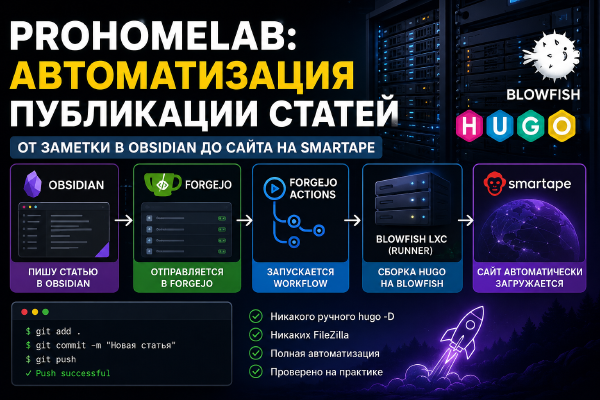
In the first article of the series I set up CI/CD on Forgejo: a systemd runner in an LXC, two repositories - prohomelab-content and prohomelab-site - and a workflow_dispatch API trigger between them, because Forgejo didn’t support repository_dispatch. In the second article I moved hosting from Smartape (FTP) to GitHub Pages, but left the build itself on that same Forgejo runner.
On paper, the plan for this third part looked simple and clean: get rid of my homemade runner entirely, let GitHub Actions’ own cloud runners handle the build, and leave Forgejo as a passive mirror - a backup in case something ever happened to GitHub. Along the way the plan changed three times, I had one genuine scare about losing every article I’d ever written, and I ended up with a setup that differs from the original idea in almost every respect - but it actually works. Worked, rather, right up until I decided to redo the whole thing again (that’s a story for the next article). What follows is the unvarnished version, potholes included.
Attempt one: a cloud runner, same two repositories as before#
The obvious first idea was: GitHub Actions already hands you runners for free, so why bother keeping your own, right? I had AI write me a workflow that runs on ubuntu-latest. That’s not my machine and not the LXC - it’s a disposable cloud VM that GitHub spins up for that one run and “kills” the moment it’s done. Since the machine is thrown away afterward, Hugo had to be installed from scratch on every single run.
I left the repository layout untouched at this stage - just like in the first two articles, content and the site itself lived separately: prohomelab-content and prohomelab-site. The bridge between them was still a dedicated script, scripts/sync-content.sh. It clones the content repository, pours its contents into the content/posts folder of the site repository via rsync, and rewrites Obsidian wiki-links for images on the fly using sed - skip that step and Hugo has no idea where those image links from Obsidian are actually supposed to point. Well, Hugo itself doesn’t care either way, but you end up with broken links regardless.
The sync script itself worked right out of the gate, no issues at all. The build, on the other hand, didn’t. The workflow had a specific Hugo version pinned, 0.140.0, and by that point the Blowfish theme already required at least 0.158.0+. Because of that mismatch, the build kept failing on the try function inside the theme’s templates - the older Hugo simply didn’t understand that syntax. The fix took one line: bump the version in the workflow file to the current 0.164.0, and the build finally went through. So much for trusting AI, huh?!
That’s also when it became clear that part of my original plan was pointless. I’d been planning to merge content and site into one repository “for later,” but there turned out to be no reason to: sync-content.sh already pulls content from a separate repository regardless of what’s actually building the site - Forgejo Actions or GitHub Actions. The first working version got along fine without merging the repositories at all.
Why I merged the repos and switched to a self-hosted runner after all#
The setup worked, but something about it kept nagging at me - a vague sense that it wasn’t quite right. I already had a fully configured LXC container with Hugo and the Blowfish theme installed - the very same one that used to run the Forgejo runner. Installing Hugo from scratch on an ephemeral cloud machine, which also took who-knows-how-long to spin up, on every single push, when a ready-to-go environment was sitting right there, started to feel like a pointless waste of time. The decision seemed logical. Or seemed logical, anyway. Register that same LXC as a self-hosted runner for GitHub Actions, so the build happens locally again instead of in the cloud.
And that’s where a second consequence of this harebrained idea showed up. If the build is happening on the same machine where the site’s source files physically live, splitting things into two repositories - content separate from site - stops buying you anything beyond the extra layer of syncing I’d just finished fixing above. So I merged both repositories on GitHub into one, prohomelab-pages-new. Obsidian now pushes straight into it, and the sync-content.sh script simply isn’t needed anymore.
Registering the self-hosted runner#
An important wrinkle right off the bat: the GitHub runner refuses to start as root (Must not run with sudo - this isn’t literally about sudo, it’s about the process running as UID 0). I had to set up a separate user for it:
useradd -m -s /bin/bash ghrunner
chown -R ghrunner:ghrunner /home/actions-runner
su - ghrunner
cd /home/actions-runner
./config.sh --url https://github.com/<user>/prohomelab-pages-new --token <token>
exit
cd /home/actions-runner
./svc.sh install
./svc.sh start
GitHub is upfront about the risk: self-hosted runners on public repositories are a potential security hole, since a fork could execute arbitrary code on your machine through a pull request. In my case that’s not really a practical risk, because the workflow only triggers on push to main and workflow_dispatch, with no pull_request trigger - a stranger’s fork simply has no way to run it. But if I ever add pull_request triggers, I’d need to come back to this. And for that, I’d actually have to remember it existed. Yeah, not happening.
After registering the runner, deploy.yml lost a lot of weight: no more installing Hugo (already sitting on the LXC) and no more syncing content (it’s just part of the repository now):
name: Build and Deploy

on:
  push:
    branches: [main]
  workflow_dispatch:

permissions:
  contents: read
  pages: write
  id-token: write

concurrency:
  group: "pages"
  cancel-in-progress: false

jobs:
  build:
    runs-on: self-hosted
    steps:
      - name: Checkout site repo
        uses: actions/checkout@v4
        with:
          submodules: recursive
          fetch-depth: 0

      - name: Setup Pages
        id: pages
        uses: actions/configure-pages@v5

      - name: Build with Hugo
        run: hugo -D --minify --baseURL "${{ steps.pages.outputs.base_url }}/"

      - name: Upload artifact
        uses: actions/upload-pages-artifact@v3
        with:
          path: ./public

  deploy:
    needs: build
    runs-on: self-hosted
    environment:
      name: github-pages
      url: ${{ steps.deployment.outputs.page_url }}
    steps:
      - name: Deploy to GitHub Pages
        id: deployment
        uses: actions/deploy-pages@v4
More potholes on the road to enlightenment#
The setup worked, but it didn’t arrive at its final shape right away - there were three separate problems along the way, and each one was supposed to teach me something different. Actually, no, scratch that - they all taught me the exact same lesson: if it works, don’t touch it.
The detail I forgot: Source in GitHub Pages#
While experimenting, I briefly switched the repository’s Source setting from “GitHub Actions” to “Deploy from a branch” - and immediately got a build failing on Jekyll (GitHub Pages: jekyll v3.10.0 ... Rendering: themes/blowfish/exampleSite/...). It turns out these are two completely independent mechanisms: as long as Source is set to “Deploy from a branch,” GitHub tries to build the repository itself through its built-in Jekyll pipeline, completely ignoring deploy.yml. The moment I switched Source back to “GitHub Actions,” the Jekyll build stopped getting in the way, and its old runs sitting in the Actions history could safely be ignored.
The secret alias: published in Hugo isn’t just a date#
The most frustrating and most educational part of all this. One of the posts failed to build with:
ERROR the "published" front matter field is not a parsable dateThe cause is a historical quirk of Hugo: the published field is reserved in its front matter config as an alias for three fields at once - date, lastmod, and publishDate. On top of that, some leftover metadata from the site’s old Astro-based incarnation was still floating around here and there. If a post has published: true (a boolean, left over from Jekyll habits) instead of an actual date, Hugo tries to parse true as a date and falls over. I spent a while trying to override this through [frontmatter] in hugo.toml:
[frontmatter]
  date = ["date", "publishdate", "pubdate", "lastmod", "modified"]
  lastmod = [":git", "lastmod", "modified", "date", "publishdate", "pubdate"]
  publishDate = ["publishdate", "pubdate", "date"]
  expiryDate = ["expirydate", "unpublishdate"]
By the docs, this should have stripped published out of all three alias lists. In practice, it didn’t help at all - the error kept coming back even on a fresh commit with this exact config. Judging by an open issue in Hugo’s tracker, handling of published is partly hardcoded as a special case rather than being fully governed by the configurable alias lists. In the end, the fix that actually worked was far simpler - stop fighting Hugo, and just put a real date in published, same as every other post. I reverted the config back to how it was.
If published: true snuck into an archetype or some old notes of yours, you can find it like this:
grep -rl "^published: true$" content/Obsidian and a folder structure that got too deep#
Now that content lives inside the same repository as the Blowfish theme (hundreds of files), you can’t just clone the whole thing into the vault - Obsidian would try to index the theme along with everything else. The fix is git sparse-checkout in cone mode: it materializes only the folder you actually need on disk, and the rest of the repository stays invisible to the filesystem.
git clone --no-checkout --filter=blob:none https://<token>@github.com/<user>/prohomelab-pages-new.git Prohomelab
cd Prohomelab
git sparse-checkout init --cone
git sparse-checkout set content/posts
git checkout main
This works reliably, but it comes with a cost. The vault ends up with an extra level of nesting - Prohomelab/content/posts/<category>/... instead of the familiar flat Prohomelab/<category>/... from back when content lived in its own repository on Forgejo.
The first idea, which didn’t work, was hiding that extra depth with an NTFS junction. The plan was to rename the real repository into a hidden folder and point an mklink /J at its content/posts, so Obsidian would see a plain flat structure directly. This would have worked fine for git - it finds .git by walking up the folder tree, and a junction doesn’t trip it up at all.
Obsidian, though, simply doesn’t show NTFS junction folders in its file tree at all - even when everything on disk is completely intact and working. From where you’re sitting, it looks like a genuine disaster: a folder with a hundred articles in it just vanishes from the vault, even though nothing’s actually wrong on disk or in git. I spent a solid few minutes legitimately panicking that I’d lost the whole archive.
I had to roll the junction back and live with the extra nesting level for now. The real fix isn’t an OS-level trick at all - it’s overriding contentDir in the Hugo config so the content physically sits closer to the repository root. That’s a separate, more careful rework I put off for the time being - and, as it turned out, for good reason.
The resulting setup#
Obsidian (Windows, sparse-checkout) → push
        │
        ▼
GitHub: prohomelab-pages-new (content + site + theme submodule, single repository)
        │
        ▼
GitHub Actions - self-hosted runner right on the LXC (the same one that used to run forgejo-runner)
        │  build: checkout → configure-pages → hugo --minify → upload-pages-artifact
        │  deploy: deploy-pages
        ▼
GitHub Pages → prohomelab.com

Forgejo - pull mirror of the whole repository (New Migration → mirror), updates on a schedule, fully passive
forgejo-runner on the LXC is stopped and disabled (systemctl stop/disable) - in its place, on the same machine, lives GitHub’s actions.runner.*, running under a separate unprivileged user. The old Forgejo repository prohomelab-site no longer needs to be active - instead I set up a Pull Mirror: a new repository in Forgejo (New Migration → This repository will be a mirror) that pulls changes from GitHub on its own, on a schedule. Important: this isn’t a “Push mirror” - that setting simply doesn’t exist on GitHub’s side at all; mirroring can only be configured from the Forgejo/Gitea end.
What actually changed compared to the first two articles’ plan#
| Before (after article 2) | After | |
|---|---|---|
| Repositories | 2 (prohomelab-content, prohomelab-site) | 1 (prohomelab-pages-new) |
| Runner | Forgejo runner on LXC (my own) | self-hosted GitHub Actions runner on the same LXC |
| Installing Hugo in CI | on every run | not needed - already installed on the machine |
| Content sync | separate sync-content.sh step | not needed - content is part of the repository |
| Forgejo | active pipeline node | Pull Mirror, fully passive |
| Obsidian | push to a separate content repository | sparse-checkout, push directly to the shared repository |
Across all three articles in the series, this is the path from “write in Obsidian → copy by hand → build by hand → upload via FTP by hand” to something fully automatic: write a note, and it shows up on the site on its own. The infrastructure didn’t grow along the way - if anything, it shrank down to a single repository and a single runner, running on hardware I already had. The price was a few nerve-wracking hours along the way that probably took a couple of days off my life, plus one false alarm about “missing” articles that turned out to be nothing more than a quirk of how Obsidian works - or rather, doesn’t work - with NTFS junctions.