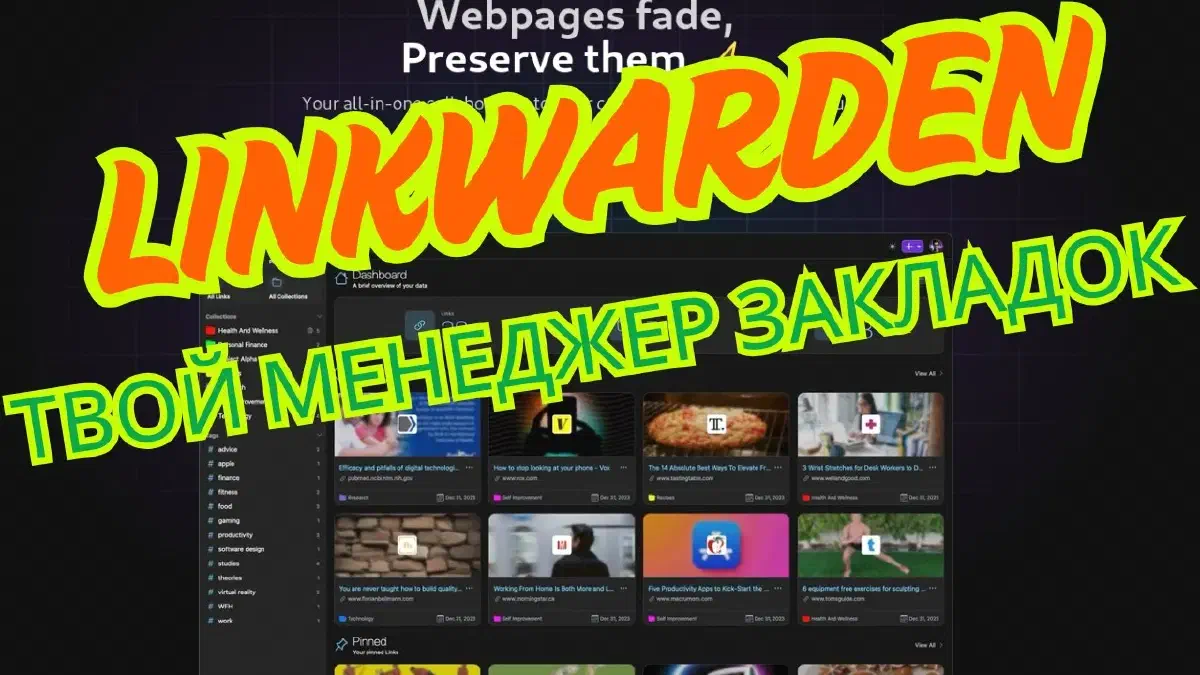

What Linkwarden is and why I ended up needing it#
I have a habit of saving “read this later” into browser tabs, and then those tabs just sit there for months until the browser starts choking on them. Regular bookmarks don’t help either - the page can vanish from the site six months later, and all you’re left with is a link title and mild regret. Linkwarden solves this in the most literal way possible: it doesn’t just remember the address, it saves a copy of the actual page - text, images, layout - so even if the original disappears, you still have a working copy.
It positions itself as a self-hosted alternative to Pocket, Raindrop.io, and Pinboard, minus the “what happens to my bookmarks if this service shuts down tomorrow” question, since it’s open source.
If this article or the video were useful, you can support the channel on Boosty - link in the contacts.
What’s inside#
- Page archiving - saves HTML, PDF, and a screenshot, your choice, not just the link.
- Reading mode - no ads, with highlighting and notes right on top of the article.
- Collections and tags - hierarchical collections plus tags, the usual setup for this kind of app, but done well.
- Full-text search - via Meilisearch, finds the material even if you forgot both the link and the title.
- Collaboration - you can share collections and hand out permissions to members, useful if you’re using it with family or a small team.
- Import/export - from your browser, out to CSV/HTML - migrating from something else isn’t a problem.
- SSO/API - Authentik out of the box, plus a REST API for your own scripts.
- Clients - a Chrome extension, a PWA, apps for Android and iOS.
- AI tags - tries to figure out what a page is about on its own and suggests a tag. Not perfect, but decent as a rough first pass at sorting.
- Wayback Machine - one click sends a link to archive.org, and for pages that really matter, an extra copy doesn’t hurt.
Authentication - email/password, Google, GitHub, plus OAuth2 providers like Authentik if you already run your own SSO.
The “just to try it” install#
The project ships with a ready-made compose file if you just want to poke around:
git clone https://github.com/linkwarden/linkwarden
cd linkwarden
cp .env.example .env
docker compose up -d
What I actually run#
Here’s the real docker-compose:
services:
  postgres:
    container_name: postgres_linkwarden
    image: postgres:16-alpine
    env_file: .env
    restart: always
    volumes:
      - /home/stilicho/docker/linkwarden/pgdata:/var/lib/postgresql/data
    networks:
      - linkwarden #not necessary if you don't use another postgres instance
      #- proxy
  linkwarden:
    container_name: linkwarden
    env_file: .env
    environment:
      - DATABASE_URL=postgresql://postgres:${POSTGRES_PASSWORD}@postgres:5432/postgres
    restart: always
    # build: . # uncomment this line to build from source
    image: ghcr.io/linkwarden/linkwarden:latest # comment this line to build from source
    #ports:
    #  - 3000:3000
    volumes:
      - /home/stilicho/docker/linkwarden/data:/data/data
    depends_on:
      - postgres
    networks:
      - proxy
      - linkwarden #not necessary if you don't use another postgres instance
    labels:
      - "traefik.enable=true"
      - "traefik.docker.network=proxy"
      - "traefik.http.routers.linkwarden.entrypoints=http"
      - "traefik.http.routers.linkwarden.rule=Host(`linkwarden.stilicho.ru`)"
      - "traefik.http.middlewares.linkwarden-https-redirect.redirectscheme.scheme=https"
      - "traefik.http.routers.linkwarden.middlewares=linkwarden-https-redirect"
      - "traefik.http.routers.linkwarden-secure.entrypoints=https"
      - "traefik.http.routers.linkwarden-secure.rule=Host(`linkwarden.stilicho.ru`)"
      - "traefik.http.routers.linkwarden-secure.tls=true"
      - "traefik.http.routers.linkwarden-secure.tls.certresolver=cloudflare"
      - "traefik.http.routers.linkwarden-secure.service=linkwarden"
      - "traefik.http.services.linkwarden.loadbalancer.server.port=3000"

networks:
  proxy:
    external: true
  linkwarden:
    external: true
The .env next to it:
NEXTAUTH_URL=https://linkwarden.stilicho.ru/api/v1/auth
# NEXTAUTH_URL=http://localhost:3000/api/v1/auth # uncomment if you're not using your own OIDC provider
NEXTAUTH_SECRET=replace_with_a_random_string
POSTGRES_PASSWORD=replace_with_your_own_password

# SMTP Settings
#NEXT_PUBLIC_EMAIL_PROVIDER=
#EMAIL_FROM=
#EMAIL_SERVER=
#BASE_URL=

#################
# SSO Providers #
#################

#AUTHENTIK_CUSTOM_NAME=Authentik
#NEXTAUTH_URL=https://linkwarden.stilicho.ru/api/v1/auth
#NEXT_PUBLIC_AUTHENTIK_ENABLED=true
#AUTHENTIK_CUSTOM_NAME=authentik
#AUTHENTIK_ISSUER=https://auth.stilicho.ru/application/o/linkwarden
#AUTHENTIK_CLIENT_ID=ID
#AUTHENTIK_CLIENT_SECRET=SECRET
A couple of things worth flagging:
NEXTAUTH_SECRET- in the developers’ own example, it’s literally the stringlinkwarden. Don’t leave it like that - it’s what signs your sessions, and anyone who’s read the project’s README knows the default. Generate something random instead, e.g.openssl rand -hex 32.- the
linkwardennetwork - alsoexternal: true, meaning Compose won’t create it for you. If you haven’t already:docker network create linkwardenbefore the first run. - The comment about “make sure the loadbalancer is the last line” from the original example - don’t worry about it. Traefik reads a container’s labels as a whole set; the order of lines under
labels:doesn’t matter at all.
How it stacks up against the neighbors#
| Feature | Linkwarden | Raindrop.io | Wallabag | |
|---|---|---|---|---|
| Self-hosted | ✅ | ❌ | ❌ | ✅ |
| Page archiving | ✅ | ❌ | ✅ (Pro) | ✅ |
| Full-text search | ✅ | ✅ | ✅ | ✅ |
| Multi-user | ✅ | ❌ | ✅ | ✅ |
| Open source | ✅ | ❌ | ❌ | ✅ |
The closest competitor in spirit here is Wallabag - also open source, also self-hosted, also archives pages. Linkwarden won out for me, mainly because of the interface, which feels more modern, and the AI tags, which aren’t perfect but genuinely save time sorting through a backlog of links.
Bottom line#
Easy to set up, sits behind Traefik without surprises (other than that default secret, which you will remember to change), and the “save it to read later” habit finally stops ending in dead links six months down the line. If you’ve got the same browser-tab graveyard I used to have, it’s worth deploying - especially since, with your own SSO (Authentik/Authelia) already in place, wiring it up takes a couple of minutes at most.