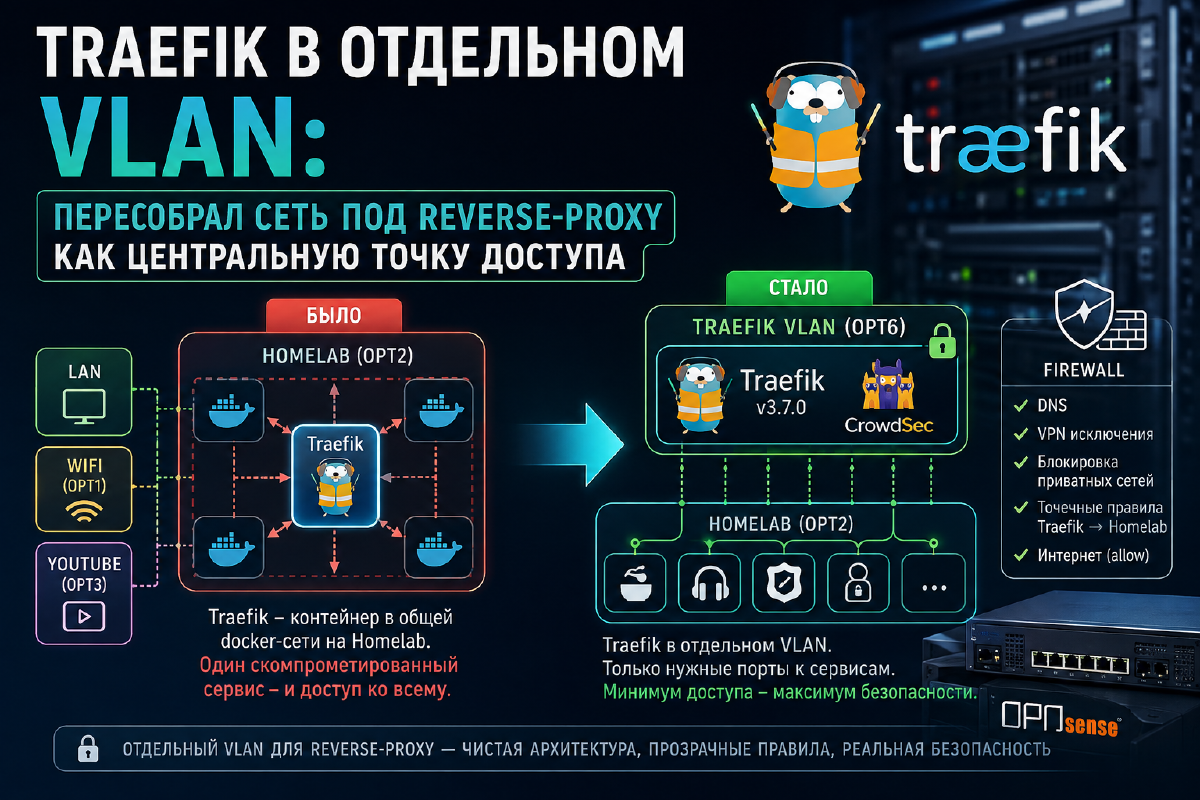

All hostnames, VLAN names, and so on are placeholder names used for the purposes of writing this article.
Previously, Traefik on my setup lived mixed in with all the other services - a container on the same Docker host (let’s call it Homelab), on the same network as dozens of other stacks. It all worked, but from a security standpoint it wasn’t a great setup: the reverse proxy, through which all external traffic and all authentication flows, had no more access privileges than any other container sitting next to it (on top of that, most containers were also on the same Docker network). Compromise any neighboring service, and an attacker is one step away from the single entry point into the entire infrastructure.
On top of that, segmentation was only partial between VLANs, since SSL certificates had to be issued for services in other VLANs. The whole logic of network segmentation broke down - it was sort of there, this segmentation of yours, and sort of not really.
Since I decided to move Traefik physically into its own LXC container (which you can read about here, here, and here), a dedicated VLAN and its own firewall perimeter were created. Along the way I was forced to rebuild the Docker networks and did a full audit of the OPNsense rules. Which, as it turns out, only paid off, because in the process of rebuilding the network and containers I caught a number of issues, one of which was quite significant. I’ll admit honestly, the cause of that significant issue was a plain typo, but in the case of a targeted attack on my network, its consequences could have been catastrophic (I’m not paranoid and I understand my place in the grand scheme of things, but I don’t see the point in ignoring basic principles of building a secure network). Below is a detailed comparison of what it was and what it became, and why exactly that way.
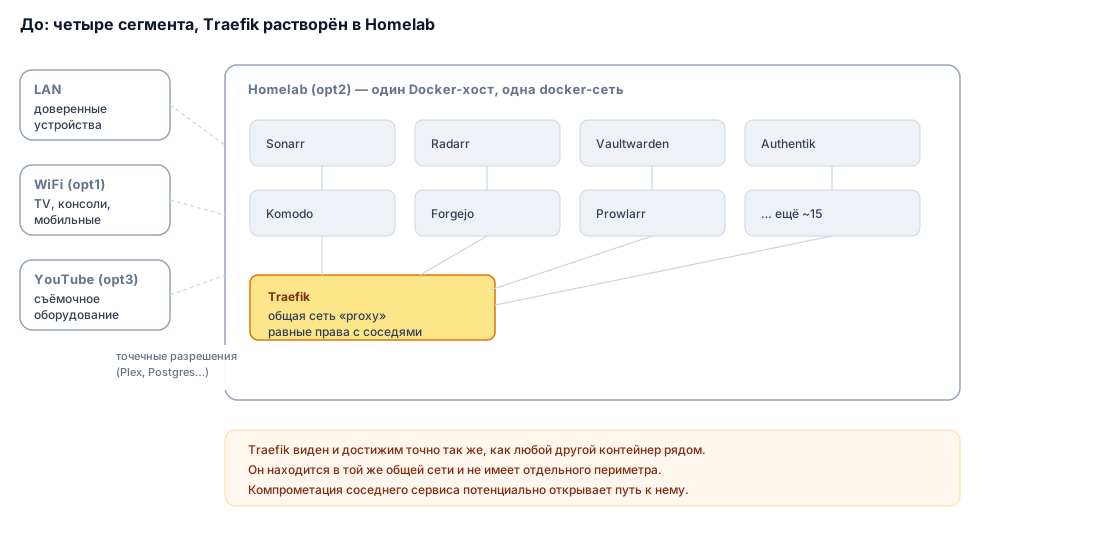
Before: four segments, Traefik dissolved in one of them#
Before moving Traefik to a dedicated LXC container, OPNsense had four VLANs:
| Segment | What lived there |
|---|---|
| LAN | trusted devices, admin access |
| WiFi (opt1) | household devices, TVs, consoles, mobile devices |
| Homelab (opt2) | Docker hosts with all the stacks, including Traefik itself on one of the docker hosts |
| YouTube (opt3) | for experiments with filming YouTube videos |
There was no dedicated rule specifically for the reverse proxy - Traefik sat as a container in the shared docker network on Homelab together with everything else (plus a separate proxy network that included both it and the backends). The firewall rules for the Homelab segment were written in terms of “what Homelab is allowed to reach outside” (Plex, Postgres, ollama), not in terms of “who can reach Traefik and under what conditions” - because that question simply never arose: everything was right there, on the same network.
After: Traefik as a separate VLAN with its own set of rules#
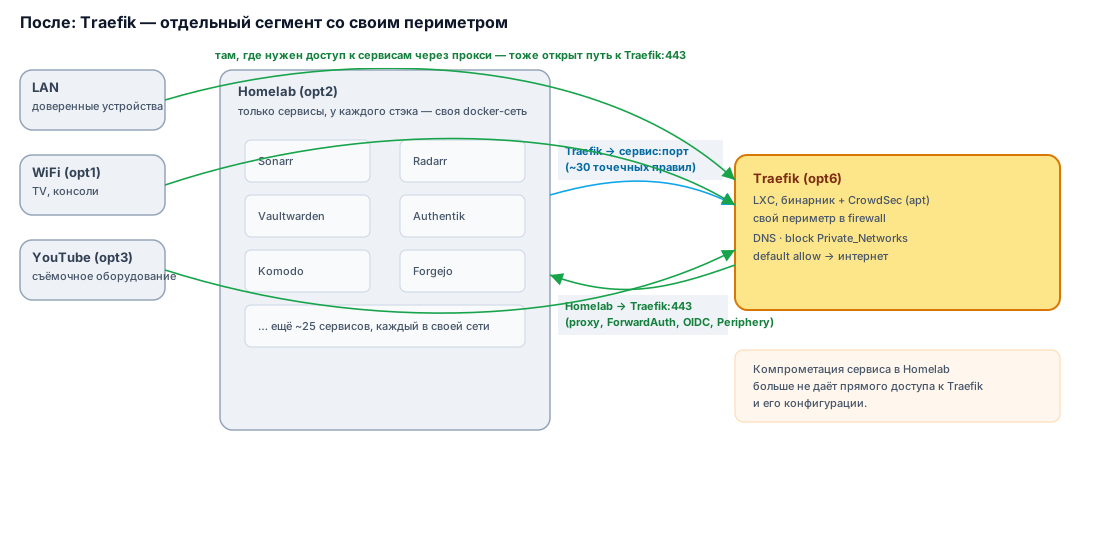
I added a fifth segment - opt6 (not a numbering typo, there are a couple more opt-interfaces, irrelevant for this article) - dedicated solely to Traefik and its CrowdSec. Traefik itself is now not a container but a native binary (v3.7.0 as of this writing) in an LXC on Debian 13; CrowdSec is also not in Docker but installed via apt, with its own LAPI and a bouncer plugin wired in as an experimental plugin in Traefik’s static config. This resulted in two independent CrowdSec instances in the infrastructure - one as a plugin right inside OPNsense, the other alongside Traefik.
I locked down the LXC to a minimum: SSH key-only, no unnecessary services on the host. Port 22 hasn’t been changed (yet). I don’t currently see the point in setting up a separate user for traefik.
The base rules on opt6 follow the same pattern as on the other segments: allow internal DNS, add targeted VPN exceptions where needed, block access to all other private networks, and only after that - default allow to the internet.
But the main difference isn’t in this standard pattern - it’s in what got added between its steps: a set of specific Traefik → Homelab:service_port rules, one per proxied service, rather than one blanket “Traefik sees all of Homelab.” The new config ended up with roughly fifty such rules compared to the old one - for example:
Traefik -> Homelab:Mealie
Traefik -> Homelab:Audiobookshelf
Traefik -> Homelab:Vaultwarden
Traefik -> Homelab:Authentik
and so on, one rule per service sitting behind the proxy.
Previously, when Traefik was physically a neighbor of these containers on the same host, this level of detail wasn’t needed - traffic between them never even reached the firewall, it stayed inside the docker bridge. Now that Traefik has moved to a separate VLAN, every interaction crosses a segment boundary - and the firewall finally sees (and can restrict) what used to be completely invisible to it.
There’s one separate disabled placeholder rule left over - “Traefik → Homelab with no port restriction.” It’s disabled, but its very existence is worth keeping under control - it’s really only worth enabling “in a pinch” for debugging, and not forgetting to turn it back off.
Port 443 in the reverse direction - not optional, but mandatory#
Separately, it’s worth mentioning the direction from the other VLANs to Traefik - this is a symmetrically important part of the setup, and without it the whole construction doesn’t work. Doesn’t work at all. The reason is fairly simple: all my services have an SSL certificate and communicate over domain names.
Traefik:443 carries:
- all external routing of requests to services (ordinary reverse-proxy traffic);
- ForwardAuth checks through Authentik for any protected resource - the browser hits a service, Traefik forwards the request to Authentik for a “let in/don’t let in” decision, and this whole cycle goes through the same 443;
- OIDC authentication for services using Authentik as a provider;
- the WSS connection of Komodo’s Periphery agents to Core - the domain
komodo.yourdomain.ruresolves to Traefik, and the agent initiates an outgoing connection to it.
That’s why the Homelab segment rules explicitly include directional allows to Traefik’s port 443 - both for Homelab itself and for other hosts that need access to services through the proxy. Without this, services simply can’t communicate over domain names.
This isn’t a patch on a problem that came up - it’s a direct consequence of the fact that Traefik is now the single point of entry for everything: for people, for services, and for internal agents alike. Any VLAN from which a request needs to go to something through the proxy or through Authentik must have this path open - without access to 443, external routing, all authentication, and communication with Komodo’s Periphery agents and similar services (Portainer, Dozzle, Arcane, or Dockhand) break at the same time, because it’s actually one and the same traffic path, not three different ones. When designing any new segment, this path needs to be accounted for up front, not left until something stops working.
Docker networks: the same principle, but inside a single host#
In addition to the firewall rules described above, I also revisited the network model at the Docker level itself. Previously all the stacks on Homelab lived in one shared docker network together with Traefik - a container from one stack could theoretically reach a container from a completely different stack over the shared bridge (if there was one), and firewall rules were meaningless there, because the traffic never even left the host.
Now each stack has its own isolated docker network, and the shared proxy network, where the reverse proxy used to sit, has been disabled - it became unnecessary once Traefik moved from Docker into LXC and started reaching backends not by internal docker name but by host IP:port through the firewall - exactly the same as everything else between VLANs. The same “targeted access instead of a shared network” principle applied at the VLAN level is now also applied at the docker-host level.
Why bother auditing rules at all if “it already works”#
When I exported the current rules and compared them line by line with the old config, several things surfaced that simply wouldn’t have been noticed in the flow of day-to-day work:
- I can’t describe the biggest issue. Not because it’s a military secret, but because it’s embarrassing. The description of one of the most important rules contained an annoying slip (not even a typo), which effectively resulted in broken segmentation.
- Some of the added rules were copied for new needs, but I never updated the descriptions attached to them - for example, the rules for access to
Traefik:httpswere labeled “Allow access to Traefik ping port,” despite having nothing to do with the ping port (8083). Functionally this doesn’t break anything, but at the next audit it’s easy to read the wrong description and draw the wrong conclusion about what’s actually allowed. I rewrote all of them; - the disabled placeholder rule on opt6 (see above) - noted separately so as not to forget it’s there, but in the end, while writing this very article, I decided to simply delete it;
- restricted access to the NAS to only ports 445 (SMB protocol) and 2049 (NFS protocol);
- the “before/after” comparison clearly showed which rules are a direct consequence of the Traefik move (the entire opt6 block and the related
:httpsallows), and which are inherited technical debt from the old scheme that’s worth cleaning up separately.
None of this would have been noticed if I’d simply checked “works / doesn’t work” and stopped there. That’s the whole point of doing an audit: not to find one big mistake, but to systematically clean out the small inconsistencies that accumulate during any migration.
Summary#
- Traefik and CrowdSec - in a dedicated LXC on their own VLAN, with no unnecessary neighbors
- Cross-segment access to backends - granular, by specific port per service (~50 individual rules instead of one blanket one)
- Access from the other VLANs to Traefik:443 - mandatory: it carries all external routing, ForwardAuth, OIDC, and communication with Komodo’s Periphery agents at once
- Docker networks split by stack, the shared reverse-proxy network removed as redundant
- The “before/after” rule audit turned out to be useful in its own right - as a way to systematically find accumulated inaccuracies in the configuration that would otherwise have gone unnoticed
If you’re planning a similar move - first write down all the hidden dependencies going through the proxy (not just “the browser opens the site,” but internal connections too - agents, webhooks, auth redirects), and provision access to 443 in both directions up front, rather than after something breaks. And don’t skimp on time for a line-by-line comparison of the configuration before and after - you’ll almost certainly find something to clean up.