
Introduction#
Anyone who’s watched my older videos might have picked up on sarcasm and irony in my voice whenever I mention AI.
You didn’t imagine it. But my irony is tied only to the madness that surrounds the AI hype. Six months ago, everyone was going crazy over ChatGPT, shouting that this was the future.
Six months have passed. Now everyone’s shouting that the future is AI agents, that everyone will be replaced by AI agents, and that employees at some NVIDIA or another should be working with 50 such agents at once. What to do with the previous “future” is unclear. But the main thing is to keep the crowd perpetually amazed - otherwise people might start asking questions, and self-proclaimed trendsetters definitely won’t like that.
Anyway, today we’re going to talk about a hyped topic: the OpenClaw AI agent. Although, I’m lying. Barely a couple of months have passed and now everyone’s raving about Hermes, but let’s talk about OpenClaw anyway.
We’ll be poking at this agent’s udder - or rather, its claws - using a TerraMaster F4-425 Pro as the test bed, since, according to the manufacturer, their newest OS called TOS 7 is specifically tailored for working with OpenClaw and is generally cutting-edge and shiny.
TerraMaster claims this is the first AI Native NAS. The intended workflow looks like this:
User
↓
OpenClaw
↓
LLM
↓
NAS tools
↓
TOS
The manufacturer promises:
- voice control of the NAS
- automation
- Docker
- virtual machines
- Jenkins
- GitLab
- REST API
- 500+ built-in APIs
- creating workflows from a text description
You can read more on the official website - https://www.terra-master.com/pages/tos7
I reviewed the TerraMaster F4-425 Pro in a previous video. It’s a NAS, and it does NAS things for us. And most importantly, despite the fact that it already had the new and fresh TOS 7 installed, officially released on June 23, 2026, the latest minor update brought a new icon design. The UI has changed quite noticeably, but honestly I don’t understand this move from the developer. What was stopping them from doing it that way from the start? And this, as I said, is just a small minor update. Strange, but okay.
What is the OpenClaw AI agent#
Now let’s figure out what an AI agent actually is, using OpenClaw as an example. In simple terms, this is probably how a human is supposed to interact with AI, rather than through the “question - answer” model.
OpenClaw is an open AI agent that runs locally on your computer and is capable of not just answering questions, but performing real actions: managing files, sending messages and emails, working with a calendar, launching programs, searching for information online, and interacting with dozens of services through familiar messengers such as Telegram, WhatsApp, Discord, and Slack (notably, none of which work in Russia).
Unlike regular chatbots, OpenClaw gets access to operating system tools and can automate complex, multi-step tasks.
OpenClaw’s main feature is complete openness and the ability to run it on your own infrastructure. The user chooses the AI model themselves, configures Skills, connects external services, and controls which actions the agent is allowed to perform.
Thanks to this, OpenClaw is suitable both for automating everyday tasks and for building a personal AI assistant that doesn’t depend on cloud services or closed ecosystems.
But you have to understand that, in effect, it’s like a body without a brain. In other words, an AI agent is the body, so it absolutely needs to be connected to an LLM, which will act as the brain.
Security considerations when working with OpenClaw#
Despite its broad capabilities, OpenClaw has a serious drawback - for full functionality, the agent often needs elevated access rights to the system and connected services. It can, and ideally should, access files, run commands, manage applications, and interact with various APIs, which means compromising the agent or misconfiguring it can potentially lead to data leaks or unwanted actions being performed.
That’s exactly why, when using OpenClaw, it’s recommended to follow the principle of least privilege: run it in an isolated environment (Docker), at minimum run it in an appropriate VLAN, grant access only to resources that are genuinely needed, and carefully review the connected tools and permissions. This approach significantly reduces the risks without a major loss of functionality.
And we shouldn’t forget that, in the ideal scenario, it thinks for you: what you need, what you don’t need, what you want. And it’s entirely possible that sooner or later it will realize the weakest link is you.
My configuration#
To run OpenClaw, I use Ollama, installed on Windows 11 Pro. All models are stored on a separate, non-system SSD.
Computer configuration:
- Operating system: Windows 11 Pro
- CPU: AMD Ryzen 5 5600X
- RAM: 64 GB DDR4 UDIMM ECC Kingston
- GPU: Intel Arc B580 with 12 GB of VRAM
- LLM model: Qwen3.5:9B
With this configuration, the model shows the following performance:
PS C:\WINDOWS\system32> ollama run qwen3.5:9b --verbose
>>> gfhgfghfghghf

---
total duration: 17.4145857s
load duration: 251.4912ms
prompt eval count: 18 token(s)
prompt eval duration: 214.962ms
prompt eval rate: 83.74 tokens/s
eval count: 955 token(s)
eval duration: 16.90268s
eval rate: 56.50 tokens/s
---
In my case, the generation speed is 56.5 tokens/s, which is more than enough for comfortable interactive use of OpenClaw.
Installing OpenClaw on TerraMaster#
Actually, installing the agent is very simple, but in my case, it didn’t go without some adventures. During installation, whenever progress hit 99%, it would reset to zero. I couldn’t figure out what was going on for a long time, until the crazy idea occurred to me to ping TerraMaster’s servers.
In the end, four addresses were added to the relevant address list of the-one-whose-name-shall-not-be-spoken:
apt.terramaster.net
104.26.2.214
104.26.3.214
172.67.71.137
And the next time, the installation went smoothly.
After deploying the app itself, I pinged my Ollama instance, since that’s what I’ll be using for examples in this article.
curl http://ip_of_the_machine_running_ollama:11434/v1/modelsThis is needed to check whether OpenClaw can reach Ollama. If your firewall rules are configured correctly, you’ll get back a list of the local AI models that have already been downloaded.
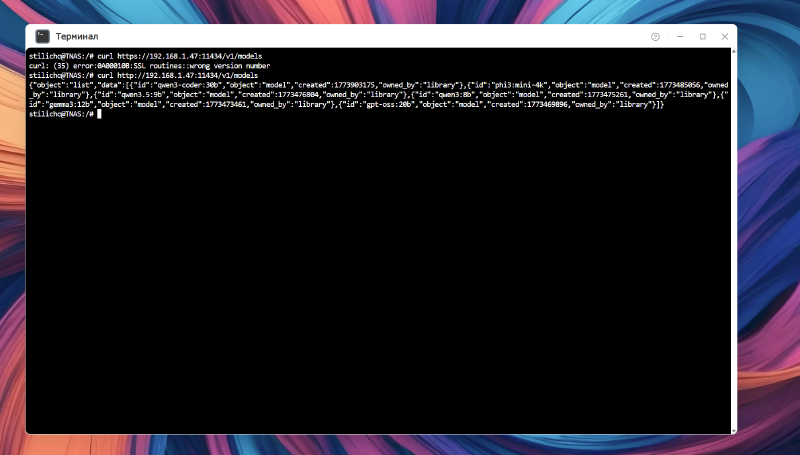
Now that we’ve installed OpenClaw and verified access to the local AI models, let’s move on to configuring the agent.
Later on, as it turned out in practice, my hardware, or perhaps a particular LLM, didn’t interact very well with OpenClaw, but you can see more details about that in the video linked at the beginning of the article.