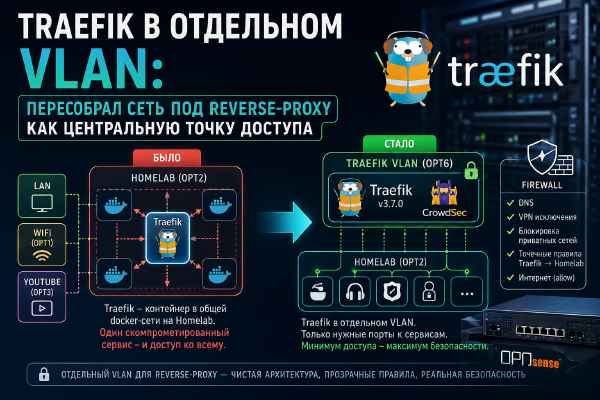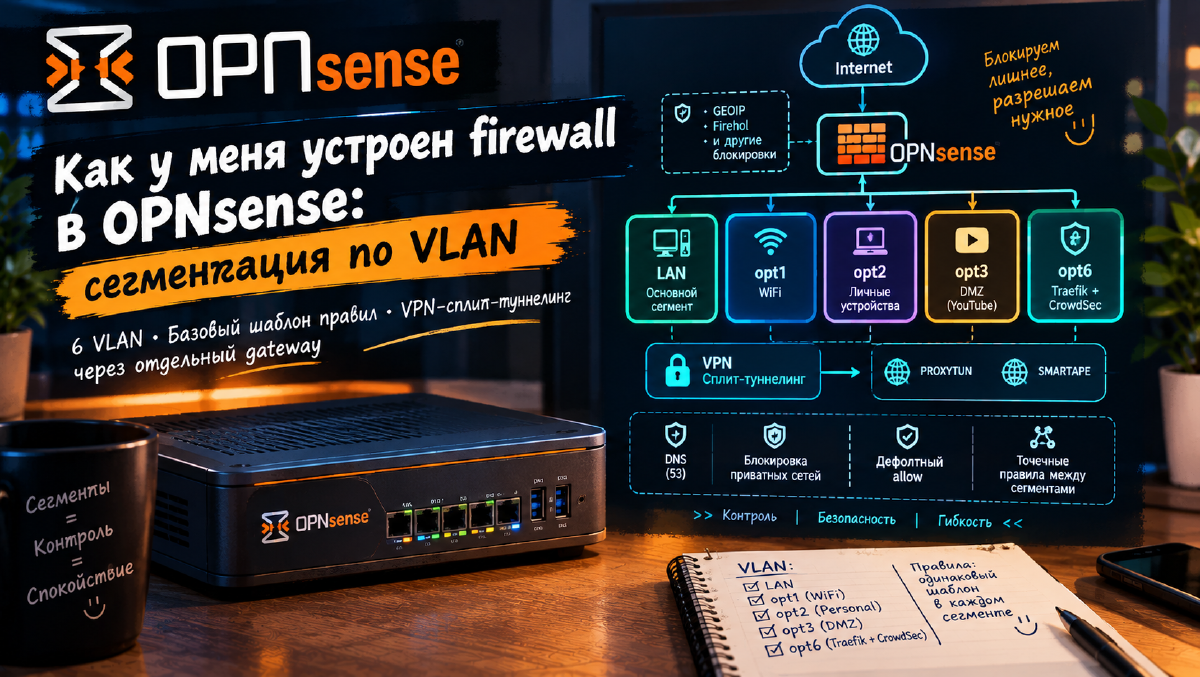

I already went deep on one specific piece of my firewall before - moving Traefik into its own VLAN, in «Traefik on Its Own VLAN: Setting Up the OPNsense Firewall». But that article only covered one segment (call it opt6) and the move of one specific service. In this one, I want to cover how my network segmentation works as a whole: how many VLANs I have, why each one exists, and the rule template that repeats almost unchanged across every segment.
How many VLANs, and why#
flowchart LR
  WAN["WAN
internet"]
  LAN["LAN
main segment"]
  OPT1["opt1
WIFI"]
  OPT2["opt2
personal-use
hosts"]
  OPT3["opt3
DMZ for
YouTube filming"]
  OPT6["opt6
Traefik + CrowdSec"]

  WAN -->|"block GEOIP, block Firehol, block CrowdSec"| LAN
  LAN --- OPT1
  LAN --- OPT2
  LAN --- OPT3
  LAN --- OPT6
Six segments as of today.
The general principle behind the rules is the same across every segment, opt6 included - the base template below is identical everywhere. Within a segment, and from a segment out to the internet, access is pretty much unrestricted (it’s a home network, not a corporate perimeter) - but between segments, access is closed by default. Every segment has a rule blocking access to other private networks sitting ahead of any allow rule (more on that below), and any cross-segment interaction gets its own specific rule. In opt6, that same point-to-point logic just scales up a lot harder than everywhere else - because that’s where the reverse proxy and the security stack live (probably not even a full “stack,” just CrowdSec, but who knows, maybe it’ll grow into one), not workstations, and every proxied service gets its own dedicated exit point.
Because of that, the “Final rule” column in the table below isn’t “what I allow by default” - it’s the name of the last catch-all rule in each segment’s chain. In other words, whatever’s left allowed after the earlier blocking rules have already filtered out cross-segment traffic. The phrase “allow to any” in a rule’s name can be misleading on its own - at the network level, the actual effect is the opposite: closed by default, and only what’s explicitly described is open. I honestly couldn’t find a cleaner way to show this without dumping every single rule into the table.
| Segment | Purpose | Final rule |
|---|---|---|
WAN | External interface | GeoIP, FireHOL, and CrowdSec blocks first, then 80 and 443 forwarded to Traefik - everything else inbound stays closed |
LAN | Main segment: workstations, NAS, admin access | Default allow LAN to any (after blocking other segments) |
opt1 | WIFI | Default allow WIFI to any (after blocking other segments) |
opt2 | Personal-use hosts | Default allow to any (after blocking other segments) |
opt3 | DMZ | Default allow DMZ to any (after blocking other segments) |
opt6 | Traefik + CrowdSec, its own perimeter (covered here) | Default allow opt6 to any (after blocking, plus 50+ point-to-point allowances for proxied services) |
WAN - what’s open and what gets dropped at the door#
The external interface is a lot simpler than the internal segments, but it’s also where the first layer of filtering sits, so it gets its own section.
Exactly two ports are open to the outside world - 80 and 443. Both are forwarded through Destination NAT to a single LXC container running Traefik in opt6, and nowhere else. I don’t keep any “just in case” forwards to individual services. Anything that’s supposed to be reachable from the internet is reachable through Traefik and only through Traefik, and from there the point-to-point rules in opt6 take over (more on those below).
Traffic still has to make it to those two ports, though. The blocking rules on WAN sit above the allow rules, and they throw out a good chunk of the junk before it ever gets a look at Traefik.
flowchart LR
  I["Internet"] --> B["WAN
block GeoIP
block FireHOL
block CrowdSec"]
  B -->|"80, 443"| T["Traefik
LXC in opt6"]
  B -.->|"everything else"| X["dropped"]
There are three kinds of blocking here:
- Country blocking (GeoIP) - a GeoIP alias backed by the MaxMind database. Inbound connections from countries I’m not expecting visitors from get dropped right away, before anything else is checked.
- FireHOL blocklists - four of them at once,
firehol_level1,firehol_level2,firehol_level3, andfirehol_abusers_1d. These are addresses of botnets, scanners, command-and-control servers, and other hosts already caught doing something nasty. The lists are pulled by URL and refreshed by cron once a day. - CrowdSec right on OPNsense - the
os-crowdsecplugin. Its Remediation Component blocks inbound connections at the firewall from any address CrowdSec has a ban decision for. Unlike the first two, this isn’t a static list I wired in by hand - the set of addresses keeps changing on its own.
All three are set up exactly the way I walked through in «OPNsense 26.1 Install Guide: Firewall Setup From Scratch» - the aliases, excluding local networks from the FireHOL lists, block rules on WAN with direction in, a cron job for updates, and installing the CrowdSec plugin. In that guide I suggested most people start with firehol_level1 alone, while my own setup runs all four, the more aggressive ones included.
These filters don’t duplicate each other. GeoIP is a blunt instrument that cuts off entire countries no matter how clean a given address is. FireHOL is targeted and catches addresses with a record, including ones from countries I haven’t blocked. CrowdSec adds addresses banned for specific behavior on top of that - brute-forcing, scanning, that sort of thing.
Whatever gets past all of that and lands on 80 or 443 then runs into Traefik, which has another CrowdSec sitting next to it in opt6 (I’ve covered it separately, in Docker and in LXC). That one looks at the HTTP requests hitting specific services, which is exactly what the firewall can’t see from where it sits.
One more detail that’s easy to miss. The GeoIP and FireHOL rules live on WAN with direction in, so they only touch inbound connections. They have no effect on where my own devices go on the way out.
The base template that repeats in every segment#
The same sequence of rules repeats almost identically across lan, opt1, opt2, opt3, and opt6:
- Allow internal DNS - lets the segment reach its own gateway IP on port 53. Without this rule, name resolution inside the segment just doesn’t work, and everything else depends on resolving internal service hostnames.
- VPN split tunneling (see the dedicated section below) - routes specific categories of traffic through a VPN gateway instead of the default route.
- Block access to all other private networks - blocks this segment from reaching every other private range (the
Private_Networksalias). This is the actual “closed by default” boundary between segments. - Default allow <segment> to any (plus its IPv6 counterpart) - whatever hasn’t been explicitly denied above, and isn’t headed to another private segment, gets through. That’s just how my home network is built: not zero-trust inside a segment, but tight control at the boundaries between segments.
lan also has:
- Allow ICMP echo request messages - so plain
pingworks inside the network; this isn’t on by default, it’s a rule I added on purpose; - Allow admin devices access to anywhere without any restrictions (the
adminsalias) - a handful of devices (my own work machines) get explicit, unrestricted access everywhere, so I’m not fighting my own firewall while troubleshooting; - the same admin rule is duplicated in
opt1.
VPN split tunneling - PROXYTUN#
Every segment except the DMZ has a pair of policy-based routing rules with the same structure: traffic to a specific list of services (an alias along the lines of “I’m not telling, go figure it out yourself”) gets rerouted through a separate gateway - PROXYTUN - instead of the normal route out to the internet.
The point of the whole setup: some services (broadly, foreign software resources, knowledge bases, and video hosting) aren’t reachable just because, that’s why (geo-blocking on their end, for instance - we’re not breaking any Russian laws here), so that traffic needs to go out through the VPN, while everything else takes the normal route through the ISP. The service lists live in aliases, so adding or dropping a service is a one-alias edit, not a hunt through rules across all six segments.
Point-to-point cross-segment permissions#
Beyond the base template, every segment has its own set of point-to-point rules for specific services - but how many there are, and what they cover, varies a lot:
opt1(WIFI) - literally a handful of specific allowances for individual devices to individual services (the media server, Traefik, and so on), nothing more.opt2(personal-use hosts) - the busiest of the “regular” segments by rule count: access to a database (an external Postgres instance, in my case) from several sources, access to a couple of internal services, and access to the NAS over file-sharing protocols (specific ports, in other words). Most of the exceptions end up here, because this segment has the most varied mix of services.opt3(DMZ) - the bare minimum: essentially just the base template, no point-to-point rules at all. Makes sense for a DMZ - that’s where everything you see me film for the channel lives, so getting in from the outside world isn’t happening. And even if it somehow did, congrats, you get to sit alone in that VLAN.opt6(Traefik/CrowdSec) - built on a fundamentally different model than the rest, so I’ll cover it separately below.lan- doesn’t stop at the base template either. A handful of rules shaped like “host →Traefik:443” exist for specific services in the main segment that need access to proxied resources. Same logic as the “from other segments to Traefik” direction covered below - just at the level of individual hosts instead of the whole segment.
opt6 - point-to-point access on top of the base template#
The base template is right here too, default allow included, same as everywhere else - but on top of it, instead of one blanket “Traefik can see the whole homelab” rule, there are 50+ individual point-to-point rules, one per proxied service:
flowchart LR
  T["Traefik
opt6"] -->|":service A port"| A["Service A"]
  T -->|":service B port"| B["Service B"]
  T -->|":service C port"| C["Service C"]
  T -.->|"~50 other services"| D["..."]
Back when Traefik was physically a friendly neighbor neighboring container on the same host and the same Docker box as most of the services, this level of detail wasn’t needed - traffic never even left the Docker bridge network. Once Traefik moved to its own VLAN, every single interaction started crossing a segment boundary, and the firewall finally saw (and could restrict) something that used to be completely invisible to it.
Just as important - and easy to overlook - is access the other way, from the rest of the segments to Traefik:443:
flowchart LR
  subgraph Others["LAN / opt1 / opt2"]
    S["Services and agents"]
  end
  S -->|"regular reverse-proxy traffic"| T["Traefik:443
opt6"]
  S -->|"ForwardAuth / OIDC"| T
  S -->|"WSS agents (e.g. Periphery)"| T
Technically, this isn’t one rule for the whole segment but a set of point-to-point rules of the form “specific host → Traefik:443”: access to Traefik is opened only for whoever actually needs it. The DMZ is deliberately left out of that list - nothing there talks to Traefik.
Without these rules, three things break at once: external routing, ForwardAuth/OIDC authentication, and the WSS connections used by background agents - because all three scenarios technically travel the exact same path over port 443, not three separate ones. This isn’t a patch for a specific problem, it’s a direct consequence of Traefik being a single entry point for people, services, and agents all at once. So whenever I set up a new segment, I have to put this path in from the start, or nothing will work. Of course, I do forget about it every now and then - but a service that suddenly stops working is always happy to remind me.
A detailed walkthrough of the move into this segment (what it looked like before, what changed, what the audit turned up) is in a separate article.
What’s next#
- A more detailed look at
opt1(WIFI) andopt3(DMZ) as their own articles, if I end up with enough interesting material. Right now there just isn’t enough going on there to be worth a write-up. - If I ever spin up another segment for something new, I’ll follow the same template: DNS, VPN split tunneling if needed, blocking private networks, a default allow, and point-to-point rules on top of that.
Links#
- Traefik on Its Own VLAN: Setting Up the OPNsense Firewall - a detailed breakdown of the
opt6segment - OPNsense 26.1 Install Guide: Firewall Setup From Scratch - step-by-step setup of GeoIP blocking, FireHOL lists, and the CrowdSec plugin