
Introduction#
In part one we prepared an LXC container, installed Traefik as a binary, and ran it in test mode - with an open dashboard and DEBUG logs, just to confirm it starts up at all. As you probably guessed, in my specific case this is about migrating a production config rather than building one from scratch, so part of the article is written with that in mind.
Since then, the bulk of the work has been done: the final static config, TLS certificates, log rotation, and a full breakdown of the dynamic config into files - including migrating a dozen services that used to be routed through Docker labels instead of the Traefik file provider.
The move to a new host naturally required going through the entire configuration line by line - and effectively turned into a full audit. Along the way plenty of interesting things surfaced, both about Traefik itself and about how some of the surrounding services were set up. But let’s take it step by step.
Getting a Cloudflare API token#
Before assembling the final static config, you need a Cloudflare API token - it’s needed for the DNS-01 challenge when issuing certificates (including wildcard, without having to expose port 80 for HTTP-01).
You certainly don’t have to use Cloudflare - any DNS provider supported by DNS Providers :: ACME client and library written in Go. will work.
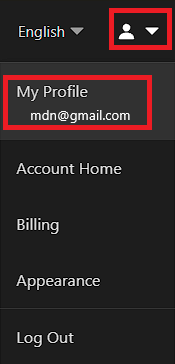
Go to your Cloudflare profile, into the token-creation section.
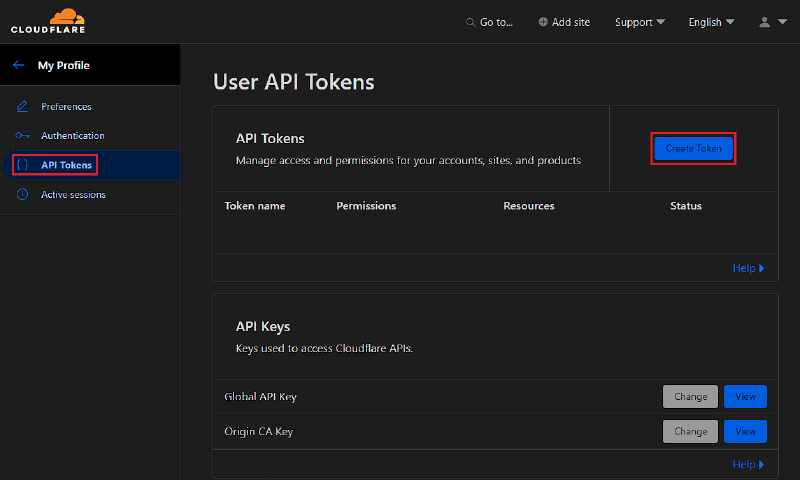
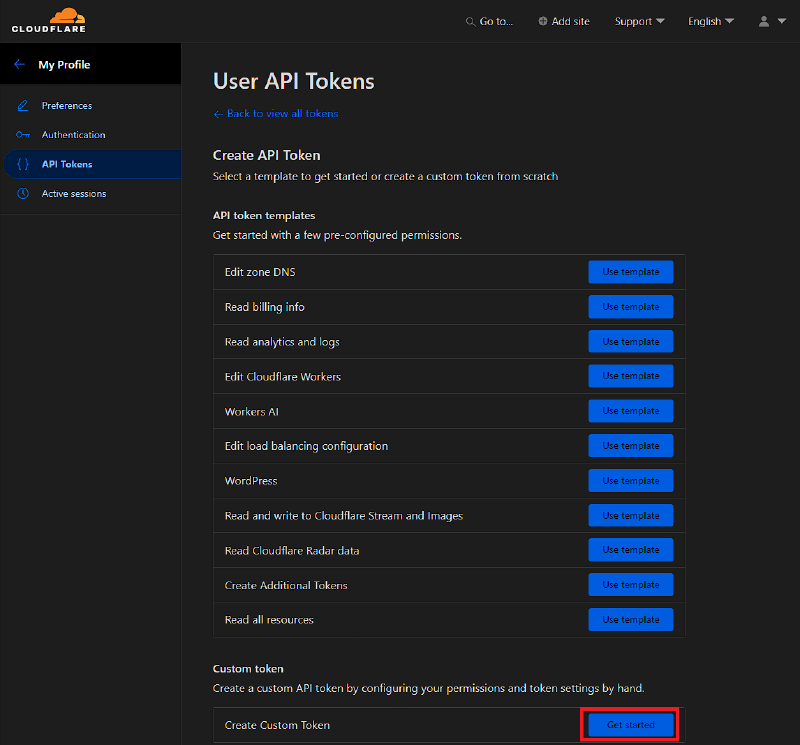
Choose to create a custom token - not a ready-made template - to limit permissions to the minimum required set rather than granting the token more than it actually needs.
Set the permissions: Zone → DNS → Edit, and where possible restrict the token to a specific zone (domain) rather than all zones on the account at once - so that if the token is compromised, the damage is limited to one domain.
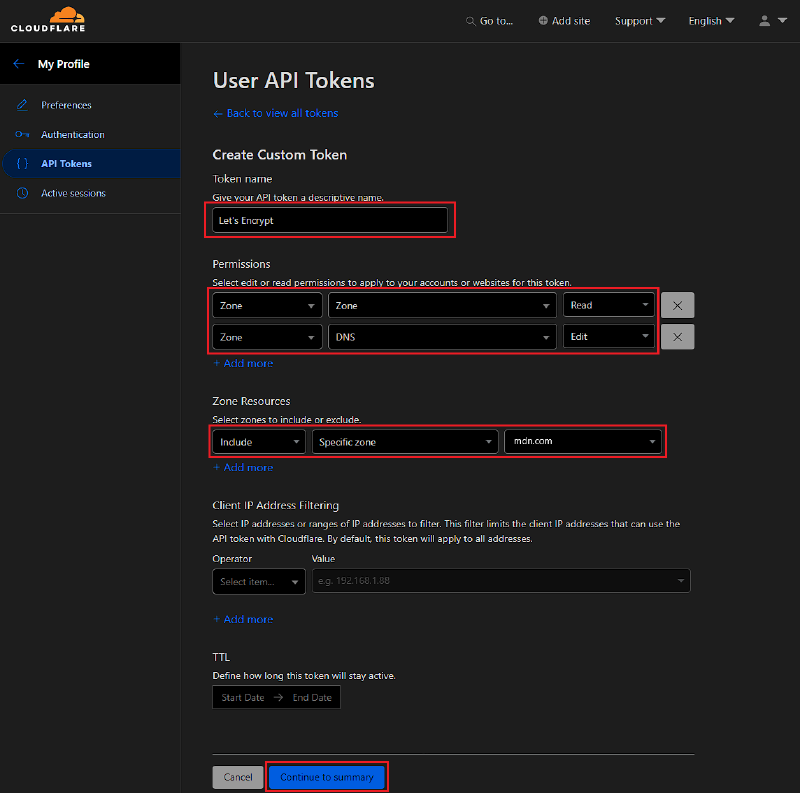
Create the token.
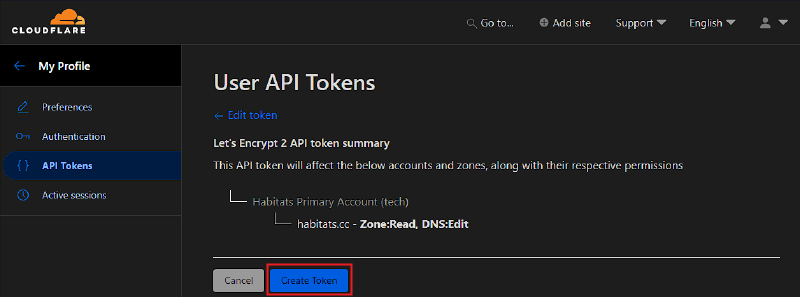
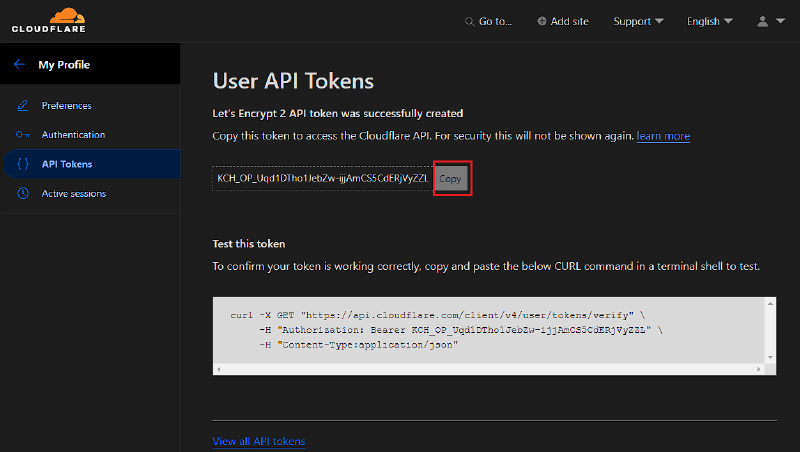
The token value is shown only once - save it immediately in your password manager. You can’t view it again through the Cloudflare interface, only recreate it.
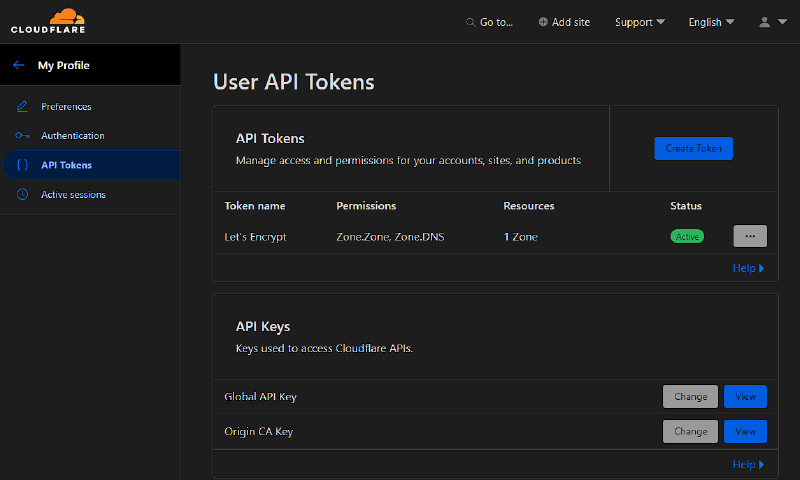
The list of already-created tokens is available on the same tokens page.
This token is the value of CF_DNS_API_TOKEN, which will go into traefik.env - more on that in the TLS section below.
Final static config#
Differences from the test version in part 1:
global:                             # Global Traefik settings.
  checkNewVersion: true             # On startup, Traefik checks whether a new version is available.
  sendAnonymousUsage: true          # Sends anonymous telemetry to the Traefik developers.
                                     # No config details or domains are ever sent.
  # Turn this off if you don't want telemetry on principle.
api:                                 # Settings for the built-in API and web UI.
  dashboard: true                   # Enables the Dashboard for viewing routers,
                                     # services, middleware, and Traefik's overall state.
  insecure: false                   # Don't expose the dashboard on a bare, unauthenticated
                                     # port 8080 - http://traefik-ip:8080/dashboard/ is dead.
                                     # See the Basic Auth section below for the real access path.
  debug: true                       # Turns on extended diagnostic info in the API.
                                     # Safe as long as the router to it is behind auth
                                     # and not just sitting open on the internet.
  disableDashboardAd: true          # Hides the Traefik Labs promo banner in the dashboard UI.
entryPoints:                        # Entry points - the ports Traefik listens on.
  web:                              # HTTP (port 80).
    address: ":80"                  # Listen on all interfaces on TCP port 80.
    forwardedHeaders:               # Settings for trusted X-Forwarded-* headers.
      trustedIPs: &trustedIps       # YAML anchor - this same list gets reused
                                     # for HTTPS below without copy-pasting it twice.
        # Cloudflare public IP list (HTTP)
        - 103.21.244.0/22           # Only trust X-Forwarded-* headers on requests
                                     # actually coming from Cloudflare's known ranges.
        - 103.22.200.0/22
        - 103.31.4.0/22
        - 104.16.0.0/13
        - 104.24.0.0/14
        - 108.162.192.0/18
        - 131.0.72.0/22
        - 141.101.64.0/18
        - 162.158.0.0/15
        - 172.64.0.0/13
        - 173.245.48.0/20
        - 188.114.96.0/20
        - 190.93.240.0/20
        - 197.234.240.0/22
        - 198.41.128.0/17
        - 2400:cb00::/32            # Same Cloudflare ranges, just the IPv6 side.
        - 2606:4700::/32
        - 2803:f800::/32
        - 2405:b500::/32
        - 2405:8100::/32
        - 2a06:98c0::/29
        - 2c0f:f248::/32
        # Internal network - the node sitting in front of this Traefik instance
        - 192.168.30.23/32          # My upstream box (a second reverse proxy or load
                                     # balancer) that sits in front of this Traefik.
        - 127.0.0.1/32               # Requests originating from the host itself.
    http:                           # HTTP-level settings for this entryPoint.
      aliasHeadersStrategy: delete  # Strips alias headers (say, X_Forwarded_For with an
                                     # underscore instead of a dash) that a backend could
                                     # otherwise confuse with the real, canonical header.
                                     # New in Traefik v3.7.12 (August 2026) - see below.
      encodedCharacters:            # Which encoded characters are allowed in the request path.
        allowEncodedSlash: true     # Don't decode "%2F" back into "/".
                                     # A handful of apps and APIs need this.
        allowEncodedHash: true      # Don't decode "%23" back into "#".
                                     # Occasionally required by REST APIs and WebDAV.
        allowEncodedBackSlash: false      # Keep "%5C" blocked - usually a sign of an
                                           # attempted path-traversal trick, not legit traffic.
        allowEncodedNullCharacter: false  # Keep "%00" blocked too - the classic null-byte
                                           # trick for sneaking past file-extension checks.
        allowEncodedSemicolon: true       # Allow "%3B" - some legacy apps still rely on
                                           # a ";jsessionid=..." style path parameter.
        allowEncodedPercent: true         # Allow an encoded literal "%" character itself.
        allowEncodedQuestionMark: true    # Allow "%3F" inside the path, not just as the
                                           # start of the query string.
      middlewares:                  # Middlewares applied to every HTTP request.
        - crowdsec@file             # Global protection against known bad IPs via CrowdSec,
                                     # applied across every service at once.
        - rate-limit@file           # Rate limiting.
                                     # Blunts basic flooding and brute-force attempts.
        #- warp-auto@file           # Cloudflare WARP integration - plugin's installed,
                                     # just not hooked into this entrypoint for now.
      redirections:                 # Automatic redirect rules.
        entryPoint:                 # Redirect from one entryPoint to another.
          to: websecure             # Send every HTTP request over to HTTPS.
          scheme: https             # Use HTTPS.
  websecure:                        # HTTPS (port 443).
    address: ":443"                 # Listen on TCP port 443.
    forwardedHeaders:
      trustedIPs: *trustedIps       # Reuse the exact same trusted-IP list
                                     # declared above for the web entryPoint.
    http:
      aliasHeadersStrategy: delete  # Same deal as on the web entryPoint.
      encodedCharacters:            # Mirrors the web entryPoint's settings exactly -
        allowEncodedSlash: true     # there's no global encodedCharacters block, so
        allowEncodedHash: true      # anything you set on one entryPoint has to be
        allowEncodedBackSlash: false      # repeated on every other one that needs it.
        allowEncodedNullCharacter: false
        allowEncodedSemicolon: true
        allowEncodedPercent: true
        allowEncodedQuestionMark: true
      middlewares:
        - crowdsec@file
        - rate-limit@file           # Rate limiting applies over HTTPS too.
        #- warp-auto@file
    transport:                      # Connection-handling timeouts.
      respondingTimeouts:
        readTimeout: 600s           # Max time to read in a client's request.
                                     # Matters for large uploads.
        writeTimeout: 600s          # Max time to send back a response.
        idleTimeout: 600s           # How long an idle connection stays open before closing.
  metrics:                          # Dedicated entryPoint just for Prometheus.
    address: ":8082"                # Metrics only live on port 8082, nowhere else.
    http:
      aliasHeadersStrategy: keep    # For internal-only entrypoints like metrics/health,
                                     # there's no untrusted external traffic to worry
                                     # about, so alias headers can just be left alone.
  ping:                             # Dedicated entryPoint for healthcheck requests.
    address: ":8083"                # /ping is served on its own port 8083, isolated
                                     # from the actual production traffic on 80/443.
    http:
      aliasHeadersStrategy: keep
metrics:                            # Metrics export settings.
  prometheus:                       # Use the Prometheus format.
    entrypoint: metrics             # Serve metrics through the metrics entryPoint.
    # Optional but recommended for deep visibility
    addEntryPointsLabels: true      # Tag metrics with the entryPoint they came through.
    addServicesLabels: true         # Tag metrics with the backend service name.
    addRoutersLabels: true          # Tag metrics with the router name.
    # Defines duration buckets for latency metrics
    buckets:                        # Response-time histogram boundaries.
      - 0.1                         # Up to 100 ms.
      - 0.3                         # Up to 300 ms.
      - 1.2                         # Up to 1.2 seconds.
      - 5.0                         # Up to 5 seconds.
ping:                                # Turns on the actual /ping healthcheck mechanism.
  entryPoint: ping                  # Serve it through the ping entryPoint declared above,
                                     # not lumped in with web/websecure's normal traffic.
tracing:                             # Exports request traces (OpenTelemetry).
  serviceName: traefik              # The service name traces show up under downstream.
  # Trace every request while validating the setup.
  # You can lower this later.
  sampleRate: 0.10                  # Trace 10% of requests - enough to see what's going
                                     # on without drowning your trace storage in noise.
  # Optional: include Traefik internal resources such as ping@internal.
  addInternals: false               # Don't trace calls to Traefik's own internals
                                     # (dashboard, ping, etc).
  resourceAttributes:                # Extra tags that ride along with every trace.
    deployment.environment: homelab
    service.instance.id: container_name    # Swap in the real container/host name.
    host.name: your_machine_hostname       # Swap in the real machine hostname.
  otlp:                              # Export over the OTLP protocol.
    grpc:
      endpoint: alloy:4317          # Collector address - Grafana Alloy, in my case.
      insecure: true                # No TLS to the collector - it's on the same local network.
serversTransport:                   # Traefik's connection settings toward the backend.
  insecureSkipVerify: false         # Verify backend TLS certificates.
                                     # This is the correct value.
                                     # A dedicated ServersTransport can be created
                                     # for individual services if needed.
providers:                          # Configuration sources.
  file:                             # Use the file provider.
    directory: /etc/traefik/dynamic # Directory holding the dynamic configuration.
    watch: true                     # Automatically apply changes without a restart.
certificatesResolvers:              # Certificate-issuance settings.
  cloudflare:                       # Resolver name.
    acme:                           # Use ACME (Let's Encrypt).
      email: email@email.com        # Certificate owner's email.
      storage: /etc/traefik/acme.json            # Where to store certificates and the ACME account.
      dnsChallenge:                 # Prove domain ownership via DNS.
        provider: cloudflare        # Use the Cloudflare API.
        resolvers:                  # DNS servers used to verify the TXT record.
          - "1.1.1.1:53"
          - "1.0.0.1:53"
log:                                 # Traefik's main log.
  level: "INFO"                     # Logging level.
                                     # DEBUG is only useful for troubleshooting.
  filePath: "/var/log/traefik/traefik.log"
                                     # Path to the log file.
  format: "common"                  # Classic text format.
  maxSize: 100                      # Rotate after reaching 100 MB.
  maxBackups: 0                     # Keep all archives.
  maxAge: 0                         # Don't delete old archives based on age.
  compress: true                    # Compress old log files.
accessLog:                          # Log of all HTTP requests.
  filePath: "/var/log/traefik/access.log"
  format: json                      # JSON is convenient for analysis via Loki,
                                     # Elasticsearch and Grafana.
  addInternals: true                # Log Traefik's own internal services
                                     # (Dashboard, Ping, etc.).
  filters:                          # Filtering entries.
    statusCodes:
      - "204-299"                   # Log successful responses.
      - "400-599"                   # Log client and server errors.
  fields:
    headers:
      defaultMode: drop             # By default don't store HTTP headers.
      names:
        User-Agent: keep            # Keep only User-Agent.
experimental:                       # Experimental features.
  plugins:                          # Third-party plugin connections.
    bouncer:                        # CrowdSec Bouncer.
      moduleName: github.com/maxlerebourg/crowdsec-bouncer-traefik-plugin
                                     # Plugin's GitHub module.
      version: v1.7.1               # Pinned version.
    traefikwarp:                    # Cloudflare WARP integration plugin.
      moduleName: github.com/l4rm4nd/traefik-warp
      version: v1.1.5
tls:                                 # Global TLS settings.
  options:
    default:                        # Default settings for all HTTPS connections.
      sniStrict: true                # Reject TLS connections without a valid SNI.
                                     # Improves security.
      minVersion: VersionTLS12      # Minimum allowed TLS version.
                                     # TLS 1.0 and 1.1 are completely disallowed.
      cipherSuites:                 # Allowed ciphers (only used for TLS 1.2).
                                     # For TLS 1.3 the list is ignored,
                                     # since it's fixed by the standard.
        - TLS_ECDHE_ECDSA_WITH_AES_128_GCM_SHA256
        - TLS_ECDHE_RSA_WITH_AES_128_GCM_SHA256
        - TLS_ECDHE_ECDSA_WITH_AES_256_GCM_SHA384
        - TLS_ECDHE_RSA_WITH_AES_256_GCM_SHA384
        - TLS_ECDHE_ECDSA_WITH_CHACHA20_POLY1305
        - TLS_ECDHE_RSA_WITH_CHACHA20_POLY1305
The main changes compared to the test config from part one:
providers.dockeris removed entirely - the whole point of the migration is to decouple from Docker and any other backend altogether;api.insecureis now explicitly set tofalse- the dashboard is protected by a dedicated router with Basic Auth (see the section below), not a bare port 8080;log.levelis back toINFO- DEBUG was only needed for the initial test;- a dedicated
pingentryPoint plus the top-levelping:block are new - the healthcheck now lives on its own port,8083, separate from regular traffic; - a
tracingblock was added, exporting to Grafana Alloy over OTLP - there was no tracing at all before this, just metrics and logs.
Update (August 2026). Some of the new fields in the config above aren’t something I dreamed up - they’re the direct result of real changes in Traefik itself. Release v3.7.12 (August 26, 2026) introduced the aliasHeadersStrategy option - it guards against header spoofing through alternate ways of writing the same header name (Go only canonicalizes header names on dashes, so it treats X-Auth-User, X_Auth_User, and X.Auth.User as three distinct headers, while a backend that turns headers into environment variables the CGI/WSGI way uppercases everything and collapses them all into the same X_AUTH_USER). It replaces the narrower underscoreHeadersStrategy, added slightly earlier in v3.6.20, and now handles every character HTTP allows in a header name besides letters, digits, and the dash - not just underscores. If you’re running anything newer than v3.7.12, it’s worth keeping aliasHeadersStrategy: delete set explicitly rather than trusting the default - for the exact same reason as the encodedCharacters settings below.
About api.debug: true#
Kept it intentionally. This enables pprof endpoints alongside the dashboard - not critical on its own as long as the router to api@internal is protected by authentication (Basic Auth or Authentik), which it is in my case.
About encodedCharacters#
Expanded the list of explicit flags here - beyond allowEncodedSlash/allowEncodedHash, which were already there, I added allowEncodedBackSlash and allowEncodedNullCharacter (both explicitly false - these are classic path-traversal tricks, no reason to ever allow them), plus allowEncodedSemicolon/allowEncodedPercent/allowEncodedQuestionMark (needed by a couple of specific apps and APIs that do something nonstandard directly in the request path).
I keep this whole block spelled out explicitly rather than relying on defaults, even though some of these flags technically just restate what Traefik already does out of the box. These settings have had a genuinely unstable history across v3 releases - the defaults have flipped back and forth between minor versions, changed silently by the maintainers, and broken apps like Matrix or Trilium along the way. Pinning them explicitly in the config is cheap insurance against surprises the next time you upgrade the binary - the exact same logic as the aliasHeadersStrategy note above.
TLS: one wildcard certificate instead of a bunch of individual ones#
Instead of specifying certResolver in every service router separately, I moved this into a dedicated file, dynamic/tls.yaml:
nano /etc/traefik/dynamic/tls.ymltls:
stores:
default:
defaultGeneratedCert:
resolver: cloudflare
domain:
main: domain.ru
sans:
- "*.domain.ru"defaultGeneratedCert sets the default certificate for all of Traefik. Any router with tls: {} (without explicit domains/certResolver) automatically gets this wildcard certificate by SNI - no need to duplicate the resolver in each of the dozen and a half service files.
The Cloudflare token obtained at the very start of the article, used for the DNS-01 challenge, is moved out of the static config into a separate EnvironmentFile:
sudo touch /etc/traefik/traefik.env
sudo chmod 600 /etc/traefik/traefik.env
# /etc/traefik/traefik.env, permissions 600
CF_DNS_API_TOKEN=your_tokenand referenced in the systemd unit via EnvironmentFile= - more on that in the unit section below.
Dashboard: protection via Basic Auth#
Since api.insecure is no longer used, access to the dashboard goes through a regular router - exactly like any proxied service, just with a mandatory authentication middleware attached to it.
The password hash is generated via htpasswd (the apache2-utils package, which we installed back in part 1):
htpasswd -nB adminThe -n flag prints the result straight to the console instead of writing it to a file; -B uses bcrypt. Worth emphasizing separately: do not use openssl passwd -1 - that’s an outdated MD5-based hash, which is cryptographically weaker and not recommended for new configurations.
Middleware:
http:
  middlewares:
    auth:
      basicAuth:
        users:
          - "admin:$2y$05$..."   # hash from htpasswd -nB
        realm: "Restricted"
The router for the dashboard attaches this middleware and points to the special reserved service api@internal - under this name Traefik itself publishes its own dashboard and API, so there’s no need to define a separate services: block for it:
http:
  routers:
    dashboard:
      entryPoints:
        - websecure
      rule: "Host(`traefik.domain.ru`)"
      service: api@internal
      middlewares:
        - auth
      tls: {}
tls: {} without an explicit certResolver - since the wildcard certificate is already configured via defaultGeneratedCert (see the TLS section above), the dashboard subdomain automatically falls under it, no need to specify the resolver separately.
Log rotation#
A separate and very important point related to logs - or rather their size: the maxSize/maxBackups/maxAge/compress parameters in the static config apply only to log: (the traefik.log file itself). There is no built-in rotation at all for accessLog: - Traefik can only reopen the file on the USR1 signal; rotation itself has to be handled by an external logrotate.
So to avoid access.log growing to hundreds of megabytes, I did the following:
nano /etc/logrotate.d/traefik-access# /etc/logrotate.d/traefik-access
# Rules for automatic rotation of Traefik's access.log.
/var/log/traefik/access.log {
daily # Check whether rotation is needed daily.
size 20M # Rotate once the file reaches 20 MB.
# Combined with daily, rotation happens
# as soon as at least one condition is met
# (a day has passed or the size was exceeded).
rotate 14 # Keep 14 log archives, then delete the oldest.
compress # Archive old logs with gzip.
delaycompress # Don't compress the most recent archive
# until the next rotation.
# Useful if the application may still
# hold the file open for a while.
missingok # Don't treat a missing log file as an error.
notifempty # Don't rotate if the file is empty.
postrotate # Commands run after rotation completes.
systemctl kill -s USR1 traefik.service
# Send Traefik the USR1 signal.
# Traefik will close the old log file and
# open a new one without restarting the service.
endscript # End of the postrotate block.
}traefik.log continues to be rotated by the built-in mechanism from the static config - two independent mechanisms for two different files, each handling its own job.
Dynamic config structure#
Directory layout:
/etc/traefik/dynamic/
├── middlewares/
│   ├── auth.yaml
│   ├── authentik-forwardauth.yaml
│   ├── default-headers.yaml
│   ├── https-redirect.yaml
│   ├── ipAllowList.yaml
│   ├── middlewares-buffering.yaml
│   ├── nextcloud-secure-headers.yaml
│   ├── onlyoffice-middleware.yaml
│   ├── rate-limit.yaml
│   ├── secure-headers.yaml
│   └── ... (a library of other Traefik middlewares kept on hand)
├── services/
│   ├── dashboard.yaml
│   ├── nextcloud.yaml
│   ├── onlyoffice.yaml
│   ├── authentik.yaml
│   ├── homepage.yaml
│   ├── plex.yaml
│   ├── jellyfin.yaml
│   └── ... (one file per service)
├── serverstransports.yaml
└── tls.yaml
One file per service or middleware. The filename immediately tells you what’s inside - no need to open it to figure out its purpose. On top of that, if everything were described in one file, you’d end up with a huge YAML that’s very hard to parse mentally.
So to create the middleware for basic authentication mentioned above, we create it with the command
nano /etc/traefik/dynamic/middlewares/auth.yamlThe dynamic configuration for the dashboard is created with the command
nano /etc/traefik/dynamic/services/dashboard.yamlMiddleware library kept on hand#
Beyond the ones actually in use, I created files for all the middlewares from the official Traefik OSS list that weren’t yet part of the structure: AddPrefix, Chain, CircuitBreaker, Compress, ContentType, DigestAuth, Errors, GrpcWeb, InFlightReq, PassTLSClientCert, ReplacePath(Regex), Retry, StripPrefix(Regex). Not all of them are wired up to real routers - some sit there as ready-made templates in case they’re needed (for example, InFlightReq will come in handy for Jellyfin/Immich during transcoding, IPAllowList - if I ever need to restrict access to part of the services by IP).
But I’m planning a separate article on my site specifically about the middlewares mechanism in Traefik.
Migrating services from Docker labels to the file provider#
More than a dozen services (OnlyOffice, Authentik, Audiobookshelf, Dozzle, Forgejo, Komodo, Gotify, Linkwarden, Mealie, Navidrome, the entire *arr stack, Portainer, Trilium, Uptime Kuma, TubeArchivist) used to be routed directly via Docker labels on the containers themselves. While migrating them to the file provider, auditing each config along the way revealed several things worth mentioning separately - some of which had worked unnoticed for years precisely because Docker resolves the container name as DNS itself.
Docker labels don’t stack - later ones overwrite earlier ones#
The least obvious finding of the audit: if the same label (for example, traefik.http.routers.X.middlewares) is declared on a container multiple times with different values - Traefik uses the last declaration, and the earlier ones are silently dropped. One of my services (OnlyOffice, specifically) had three such duplicates in a row - only the last one was actually applied, and the two before it had no effect whatsoever, with no signal that anything was wrong, and I lived in ignorance of it.
Docker DNS names don’t resolve outside the Docker network#
An obvious thing on paper, but very easy to forget: addresses like http://authentik_server:9000 or crowdsec:8080 only work within the same Docker network. When Traefik moved to LXC, all such addresses had to be replaced with the real IP of the Docker host - including the environment variables of the applications themselves (for example, the TRUSTEDREVERSEPROXY/whitelist parameters in Trilium and Navidrome, which trust headers from a specific subnet).
OIDC client vs. forwardAuth - don’t mix them up#
The stack turned out to have two different authentication patterns via Authentik, and it’s important not to confuse them:
- forwardAuth middleware on Traefik - needed for applications that don’t speak OIDC themselves (Dozzle, Navidrome, the entire *arr stack, Uptime Kuma). Traefik intercepts the request before it reaches the application and checks the session against Authentik.
- Built-in OIDC client in the application itself - Gotify, Mealie, Trilium, Vaultwarden, and Komodo can talk to Authentik directly as an Identity Provider. Here the
authentik@filemiddleware on Traefik isn’t needed and would be redundant - the application already requires login on its own.
Final systemd unit#
At this point the initial reverse-proxy setup is essentially done. There’s still one more thing left, though - turning our reverse proxy into a full-fledged service so we can use the standard systemctl commands.
nano /etc/systemd/system/traefik.service# /etc/systemd/system/traefik.service
# systemd unit for running Traefik as a system service.
[Unit]
Description=Traefik Reverse Proxy
# Short description of the service, shown in systemctl status.
Documentation=https://doc.traefik.io
# Link to Traefik's official documentation.
After=network-online.target
# Only start Traefik after the network is fully up.
# This is especially important when using DNS Challenge and remote backends.
Wants=network-online.target
# On startup, also try to activate network-online.target.
# Unlike Requires, it's not treated as an error if the target isn't reached.
[Service]
Type=simple
# Traefik runs as a regular foreground process.
# systemd considers the service started as soon as the process starts.
EnvironmentFile=/etc/traefik/traefik.env
# Loads environment variables from a file.
# Usually holds secrets, such as the Cloudflare token,
# so they don't end up in Traefik's configuration.
ExecStart=/usr/local/bin/traefik --configfile=/etc/traefik/traefik.yaml
# Command to start Traefik.
# Uses traefik.yaml as the configuration file.
Restart=on-failure
# Automatically restart the service
# if it exits with an error.
RestartSec=5
# Wait 5 seconds before restarting.
# This prevents an infinite loop of instant restarts.
[Install]
WantedBy=multi-user.target
# Start the service automatically at boot,
# after the standard multi-user runlevel is reached.Runs as root (a deliberate choice for this homelab) - so AmbientCapabilities=CAP_NET_BIND_SERVICE isn’t needed, but if you decide to switch to an unprivileged user, that’s the first thing you’ll need to add along with User=/Group=.
systemctl daemon-reload
systemctl enable --now traefik.service
Now the standard commands are available:
systemctl status traefik    # unit status
systemctl restart traefik   # restart after editing the static config
systemctl stop traefik      # stop
What’s still left for the future#
Intentionally left for a separate pass, outside the scope of this article:
- Installing and configuring CrowdSec alongside Traefik. The plan is to install it via apt, with a local LAPI on
127.0.0.1:8080,acquis.yamlreadingaccess.logdirectly from disk, and a new bouncer key instead of the old one (the one that used to sit in the open in the Docker config has already been revoked). Not yet installed - the corresponding middleware in the entrypoints static config is commented out for now. See part 3 for the details. - Forwarding backend ports on the Docker host - currently some services (OnlyOffice, Authentik, and others) are unreachable from the new Traefik segment; the ports need to be published on a specific host IP and allowed selectively via firewall rules between network segments.
- Resolving a port conflict - Portainer and Authentik both target port 9000 when proxied, need to separate them.
- Switching real domains from the old Docker-based Traefik to the new one - in batches, verifying each service, not all at once.
Once that’s done and the new Traefik is handling live traffic, the old Docker container can be shut down. There will likely be a separate part three about that.